Archive / NO.012 · Local AI · ASR · TTS · ESP32 · Miaoban · VoiceHub
From an ESP32 to a Local VoiceHub on a Mac: A Pipeline That Can Speak
Hook Miaoban up to a local listen → think → speak loop on a Mac, then add a head that turns toward sound. The limits here come from the real device and the repo. The end of the piece walks you through getting that loop running on your own machine first.
CONTENTS 10
- 01 1. Why the "brain" stays on this machine
- 02 2. Hardware split: cat head, Mac, base
- 03 3. The software path: listen → think → speak
- 04 4. What actually worked, and where it was slow
- 05 5. Two failures on the bench
- 06 6. Five pitfalls
- 07 7. Who should build this, and who should wait
- 08 8. Follow along: make the Mac speak first
- 09 9. The repo, and what is next
- 10 References
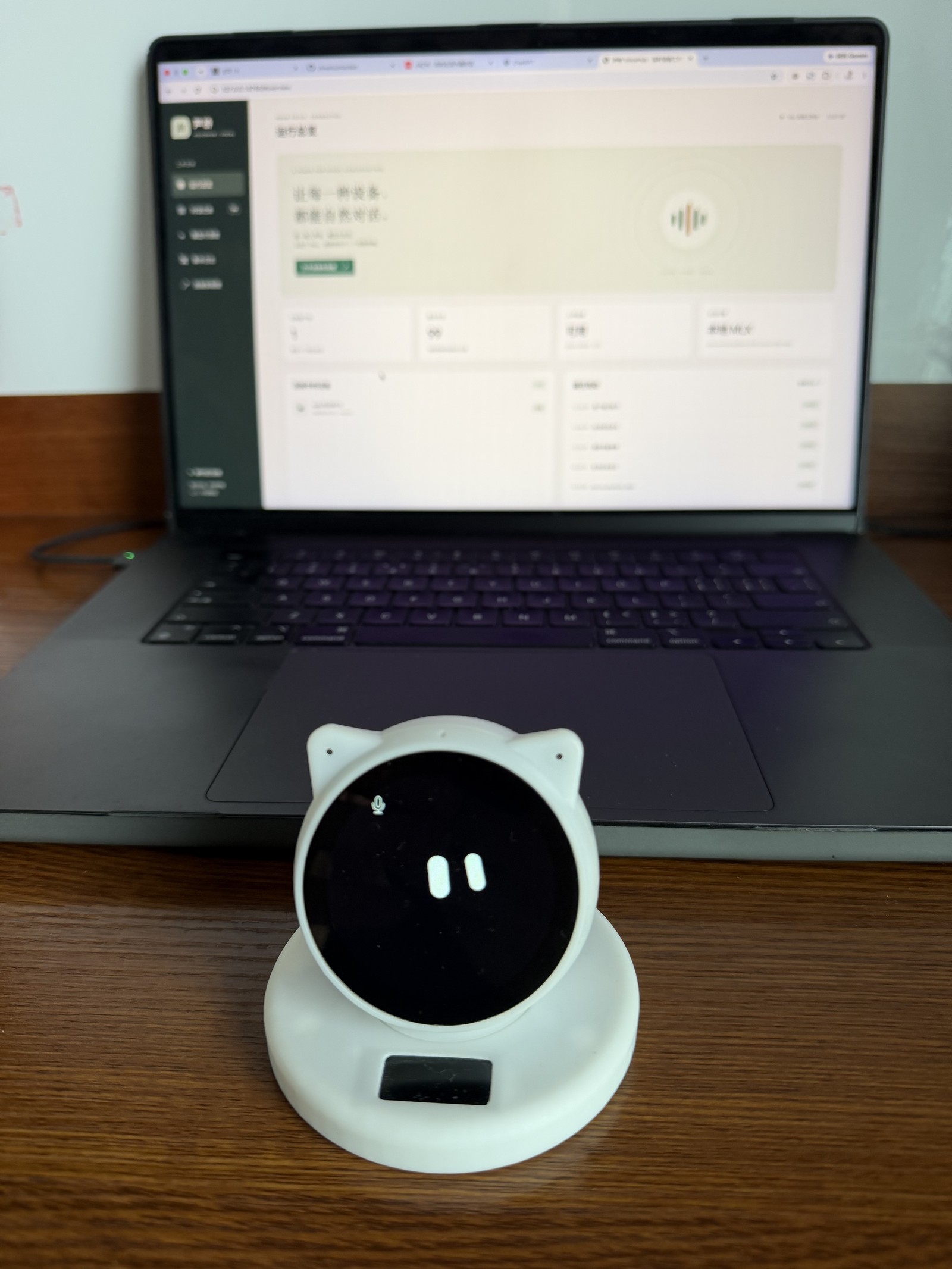
I have a Miaoban (喵伴) on my desk. The cat head can listen, light up its eyes, and make a sound, and the base can turn the head. I wanted it to use the models on my own Mac. Shout "小宝同学", and it understands, thinks, then speaks in a voice I picked. When someone nearby talks, it can also turn its head toward the sound.
What took the time was usually not writing code. It was getting the device, the backend, the models, and the motor into the same state. What does "the states do not line up" mean? Two moments from the bench are enough.
One is the quiet robot. You have just finished talking. The console already shows a complete answer, every character in place, and the cat head says nothing — as if the backend has written the line and the actor never got the cue to open the microphone. The other is the stuck turn. The microphones clearly hear someone else speaking, but the base reports stall protection and the head does not move. The listening layer is fine. The turning layer has stopped itself. Every layer can read "normal" while the whole path is still not through.
The source is at zhiwehu/miaoban (the 0.1 source release). The numbers in this piece come from the repo's docs/VALIDATION.md, the Chinese technical article in the repo, and listening again on the real device. They are single observations, not a promise across machines. At the end there is a follow-along: even without a Miaoban, you can get listen → think → speak running on a Mac first.
1. Why the "brain" stays on this machine
A cloud voice assistant is easy. You speak, the cloud listens, the cloud thinks, the cloud synthesizes a voice, and it comes back. I still keep the inference on this machine, for three reasons:
- Privacy. In an ordinary conversation, speech stays on the machine for "turn it into text → think of a reply → synthesize a voice." You do not have to hand every sentence to a cloud model.
- Control. Which step was slow, which turn should be cancelled, which layer the log is stuck on — you can change it and look it up yourself.
- Latency you can touch. When the load rises, you can see whether listening slowed down, thinking slowed down, or speaking slowed down. On your own machine that is clearer than guessing at a cloud queue.
Two sentences need to be split apart up front, or the rest is easy to misread:
- "Local inference" does not mean "this whole machine never touches the network." The first model download, where the firmware looks for an update, and where the device gets its config still have to be set by you, explicitly. The runtime adapter I use only reads models that are already downloaded. The device can also point its update address back at the local backend. That is a configuration choice, not magic.
- "A live conversation" does not mean "natural barge-in that has already been signed off." A protocol that can carry audio in both directions does not mean that interrupting the robot while it is speaking already feels natural. The repo says this straight: acoustic echo cancellation (AEC) with the speaker actually playing, and natural interruption, are not finished being validated.
2. Hardware split: cat head, Mac, base
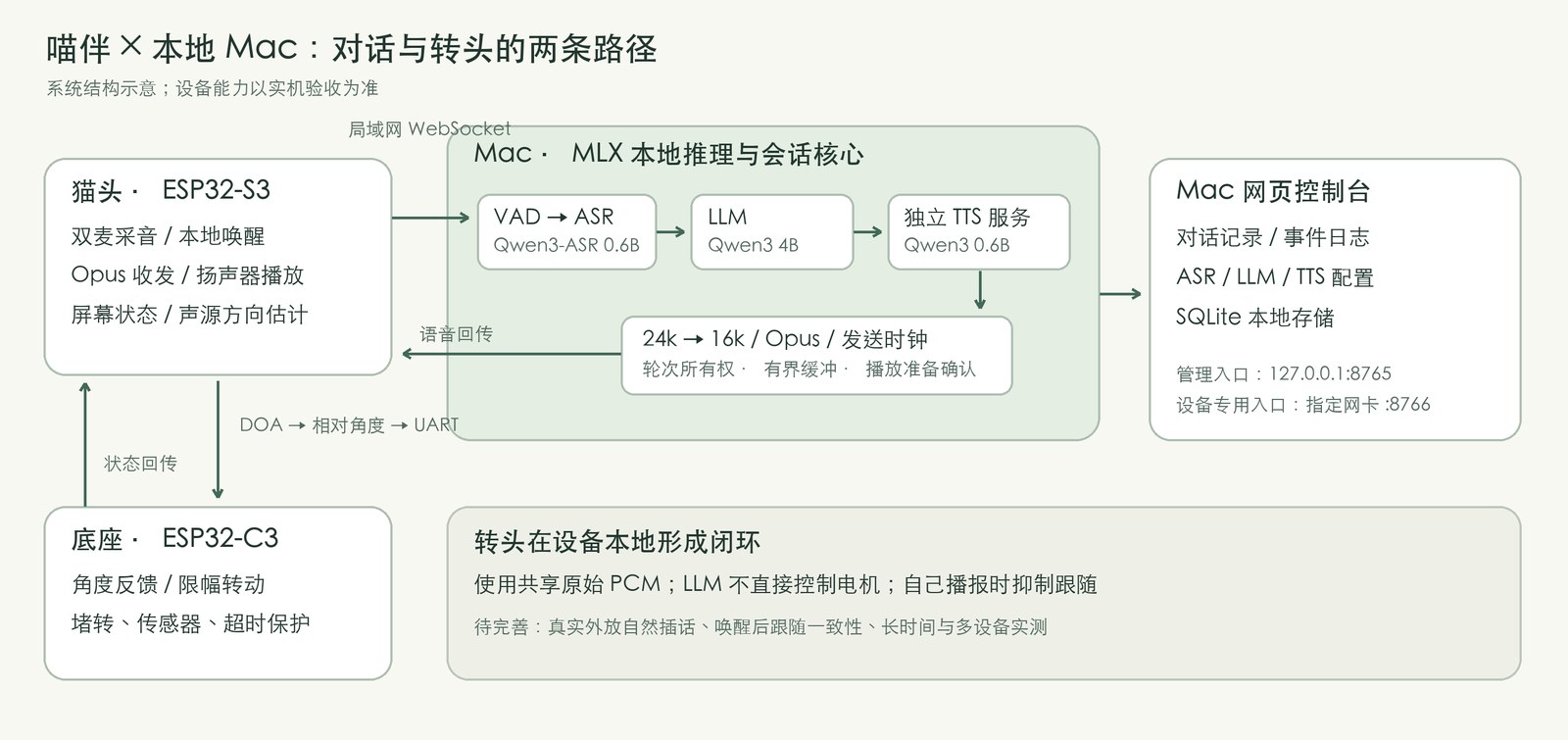
The build is three pieces, each doing its own job. One sentence is enough to hold onto: the cat head listens and speaks, the Mac thinks, the base turns.
| Part | What it does, in plain words |
|---|---|
| ESP32-S3 cat head | Two mics capture audio, a local wake on "小宝同学", encode the sound and send it out, play it on the speaker, draw expressions on the screen, and estimate which side the sound came from |
| Apple Silicon Mac | Decide whether you have finished speaking, turn speech into text, generate a reply, synthesize speech, hold the session, and serve a local web console |
| ESP32-C3 base | Read the current angle, turn the head within a limited range, and protect against stall, timeout, and travel limits |
The chip in there is an ESP32. Think of it as the small computer inside the cat head and the base that runs the embedded program. It does real-time capture, playback, and turning. It does not run the large model.
The cat head and the Mac sit on the same LAN. There are two ways in now, and both are spelled out below. One is WebSocket: control and audio share one connection. The other is MQTT for the control signals, with the audio on UDP. Behind both entrances is the same session, model, and record-keeping logic. The device entrance wants a token. The admin page listens only on the machine's loopback (127.0.0.1) and is not open to the outside. Sound-source localization and the motor go over a serial link on the device. The large model does not decide how many degrees the servo turns. It is responsible for the reply. Turning the head is the device's own business.
The test machine in this piece is an M4 Max with 128GB of unified memory. That is the environment the numbers were observed in, not the project's minimum. A different chip, a different amount of memory, and other load on the backend will all change the latency.
The architecture sketch is in the repo at media/architecture.png (a diagram, not a photograph made for a product page).

3. The software path: listen → think → speak
Plain language first, then the abbreviations:
- Listen. Turn what you said into text. The field usually calls this ASR (Automatic Speech Recognition).
- Think. Generate a reply from the session history. The field usually calls this an LLM (a large language model).
- Speak. Turn the reply into sound that can be played. The field usually calls this TTS (Text-to-Speech).
There is another step in between, VAD: decide whether this stretch is a human voice and whether you have finished, so a whole sentence can be cut out and handed to "listen." Without it, the system does not know when to start recognizing in earnest.
The local backend is called VoiceHub in the repo (声桥, a voice bridge). Its job is to connect the device to local models. The public configuration right now, from the repo article and the dependency notes:
| Stage | Model | How it runs |
|---|---|---|
| Listen (ASR) | mlx-community/Qwen3-ASR-0.6B-8bit | MLX Audio (audio models on Apple silicon) |
| Think (LLM) | mlx-community/Qwen3-4B-Instruct-2507-4bit | MLX LM |
| Speak (TTS) | mlx-community/Qwen3-TTS-12Hz-0.6B-CustomVoice-8bit | Its own long-running MLX process |
| Voice | CustomVoice presets such as Serena | Usable for a Chinese listening check |
Early in integration I used the system voice built into macOS first. The name you often see in the UI is Tingting. That took one "neural TTS" variable off the table: confirm that recognition, the reply, the audio format, and playback on the device all chain together, then switch to Qwen TTS. When something goes wrong, it is easier to tell a model that is not up to it from a path that was never connected.
How one sentence moves:
Two mics capture audio → network access → VAD cuts a sentence → local listen (ASR)
                                    ↓
                             session history → local think (LLM)
                                    ↓
                        split sentences → local speak (TTS) → resample (for example 24k→16k)
                                    ↓
                         network access → speaker

Network access: WebSocket, or MQTT control messages + UDP audio
A few tradeoffs are clearer as scenes than as a pile of terms:
- Listen mainly handles a sentence that has already been cut, not words appearing on the screen one by one while you are still talking. So "a live conversation" means a connection that stays up, a reply that comes in on its own, and audio that starts playing while the rest is still being generated. It does not mean that barging in at any moment, while it is speaking, already feels natural.
- Speak runs in a different process from listen / think, so they are not stuck waiting on each other in the same work queue. They still share one Apple Silicon GPU. Separate processes are not separate compute. Generate images while you chat, and TTS still gets dragged down.
- The interface can be swapped for a compatible HTTP service. What this piece actually ran is the local models.
- The backend keeps devices, sessions, connections, and an id for each reply (
turn_id) apart. After you interrupt an old turn, late text or audio must not be poured into the new one. "Generated" in the console only means the model finished. Without a playback confirmation, do not write it down as "the user has heard it." An MQTT control connection can stay online without meaning that some voice session has to keep occupying "listening." The line being up, and the system actually listening to you, are two different things.
I also made a local web console. It shows the recognized text, the reply, the connection state, the time each turn took, and errors, and it can change the listen / think / speak configuration. With only a serial log, it is hard to tell whether a silence stuck on "never recognized," "never generated," or "generated, but never played out."
4. What actually worked, and where it was slow
Confirmed
- Local listen → think → speak can finish a real conversation on the device. Listening back, I confirmed that Qwen plus Serena is usable now.
- On the default-branch side: about 49 automated tests in the backend, and another 9 C++ tests for the base, direction, and related logic that can run on the host. The version after MQTT was added is recorded in the repo's technical article as 67 backend tests. The boundary is below.
- Standby turn-toward-sound already has feedback from the real device. The base once reported
STALL=2(a stall). After I checked for something physically in the way and powered it back on, the fault cleared and turning came back. - At the 0.1 source release, the cat-head and base firmware could be built in a clean temporary directory (see
VALIDATION.md). That checks that the snapshot builds. It does not mean a byte-for-byte match with one historical upstream commit.
Latency (one observation, not an A/B)
| Observation | Result |
|---|---|
| One Qwen TTS sentence under a lighter load | About 3.36 s of audio / 2.05 s to generate, first packet about 522 ms, RTF≈0.61 (generation faster than realtime playback) |
| A similar length, with a higher parallel load | Generation about 10 s. Playing while generating is easy to starve: playback reaches a point the rest has not been made yet |
| LLM→Qwen→16k→Opus→WS, simulated receive | About 4.5 s of audio, 75 packets; 0 simulated buffer starvations |
The TTS first packet is not the total delay from "you finished speaking" to "the robot made a sound." The total also includes waiting until you finish (VAD), turning speech into text, thinking of the reply, the playback-ready handshake, and buffering. Once the load comes up, even a small 0.6B model gets obviously slower. Do not read the number as "always this many milliseconds."
Does switching to MQTT make the reply come faster?
Later, while debugging, I asked myself a question. MQTT is very common around ESP32. Would replacing WebSocket make this faster? So I added an entrance that uses MQTT for control and UDP for the sound, and compared the two on the same Miaoban.
Say what "MQTT mode" is, so it does not get heard as "all the audio is stuffed into MQTT":
- Control messages (the hello, start listening, start or stop playback, and the rest) go over MQTT.
- Opus audio goes over its own UDP channel.
- Listen / think / speak, the session history, and the cancel logic stay shared. The only thing that changes is the transport adapter.
A sketch:
WebSocket: cat head ←── control + audio ──→ Mac backend

MQTT+UDP: cat head ←── MQTT control ──→ local broker ←──→ Mac backend
              ←────── UDP / Opus audio ──────→
I used Mosquitto on this machine as the broker, gave the backend and each device different accounts, and used topic permissions to limit who may publish and who may subscribe. MQTT provisioning uses a token that belongs to that device, and it checks identity. The original WebSocket device token cannot be reused as MQTT credentials. In the LAN bring-up config, the encryption format used for UDP has no message authentication tag, and MQTT and HTTP are not on TLS either. So this fits a trusted local network only. It is not a setup you can leave open on the public internet.
Software measurements with the models taken out of the picture, on the same Mac and the same LAN, after warmup: the median session handshake was about 3.11 ms on WebSocket and about 1.47 ms on MQTT+UDP. The control-message round trip was slightly faster on WebSocket, about 0.57 ms versus 1.47 ms. Both are milliseconds. They do not explain a wait of several seconds before the reply. On the device, both sides answered normally, and to the ear "the difference was not obvious." The first turn after a cold start can still take several seconds. The bulk of that is recognition and getting the model ready, not the change of protocol.
The conclusion has to be written narrowly. Both protocols work. The comparison we have is not enough to say that switching to MQTT will reliably speed it up. After the comparison I put Miaoban back on MQTT+UDP and kept the WebSocket entrance. As the repo's technical article put it when it was updated, the MQTT implementation and the full test record are in PR #1, and at that time it had not been merged into the default branch. What is described above matches the version already deployed and measured on this machine. If you start only from the default-branch README, take WebSocket first. You do not have to switch just to be faster.
5. Two failures on the bench
After about fifteen quiet seconds: words, and no sound
A continuous chat is audible. Stay quiet for a while and speak again, and the backend still recognizes and still generates, but the cat head is silent. Say another sentence and it sometimes comes back. The first reaction is easy: did the audio model exit on its own?
I did not keep turning the volume or swapping models. I read the firmware's power-management path. The device turns audio output off after about 15 seconds with no playback. The timing lines up with what I was seeing.
The old playback path, when it opened the output again, still used the activity time from the last playback. There is a race between the power timer and the path that turns the output on. An output that has just opened can be closed again by that old timeout decision. Also, when the cat head receives "start playback," it only queues a state change onto the main task. That does not mean the decoder has already been reset and the speaker is already ready to take audio.
The fix has two layers:
- Refresh the activity time before opening the output. Opening the output and the timed shutdown share one lock.
- Add a playback-ready handshake. After the cat head switches to "speaking," resets the decoder, and brings the output back, it replies with
tts.ready. The backend checks the turn and the state, then sends packets.
On the listen-back, two turns received 40 and 70 audio packets. The decode and playback counts kept up, and dropped state packets were 0. That is evidence this path is worth keeping. It is not evidence that every sleep cycle has been checked.
When you chase this yourself, do not swap the model first. See whether the device sent tts.ready, and whether the receive, decode, and playback counts went up. If the words are there and the counts do not move, "speak" most likely never reached the speaker. It is not that "think" failed to come up with an answer.
The backend is already on standby, and the cat head is still "listening"
Xiaobao has a few screens that are easy to read: standby that shows only the eyes, listening with a vertical bar changing above the eyes, and a conversation screen that shows text. The picture helps a person understand the state. While you are developing, you still have to look at the real state machine. The screen saying "listening" does not mean the backend is still willing to take your audio.
I hit this one. After a long time with nobody speaking, the cat head stayed on the listening screen. Talking to it directly got no response, and shouting "小宝同学" could not wake it either.
The cause: by default the backend enters standby after about 30 seconds idle, and it did not sync that change to devices on the old protocol. The cat head stayed in Listening and turned local wake off. The backend, for its part, drops audio uploaded in device mode while it is in standby. Both ends jam at once. One side thinks it is still listening. The other has already stopped accepting.
The old protocol has no shared standby command. The handling has to be said separately for each way in:
- WebSocket. After the timeout, close the current conversation connection. The cat head uses the disconnect callback it already has, returns to Idle, and restores local wake. The next wake connects again.
- MQTT. Send goodbye, close the current audio session, and keep the MQTT control connection. The line is still there. This voice session is simply over. The cat head returns to Idle the same way, and the next time it opens an audio session again.
Wake-word detection, the voice conversation, and "the connection is still alive" are three different things, and the transitions have to be designed together. Watch only one of them and you get the strange scene where the screen is still listening and a person cannot wake the device.
6. Five pitfalls
- Every layer can be green, and the whole machine can still be silent. Judge by whether the user heard it. Do not stop at the text in the console. "Generated" only means the model finished.
- Sample rate, and the edge of raw audio. Qwen TTS is often 24 kHz. The device protocol wants 16 kHz. Resample continuously, carrying state forward inside the same turn. Do not build a new resampler every time a chunk arrives, and do not push a WAV or MP3 that still has its file header in as raw PCM. What comes out sounds like noise or silence, not like a voice that is merely worse.
- The send clock can wreck how it sounds. "Finish sending one chunk, then sleep for that chunk's duration" stretches 800 ms of audio to about 1.17 s. Keep the playback clock from the running sample count, and use a bounded queue between sentences. Electrical noise and stutter are not automatically bad TTS quality. Sometimes the send is uneven and the speaker is waiting for the next frame.
- Emoji gets read aloud. The model likes a smiley at the end of a sentence, and the system voice speaks the words 「脸颊泛红的笑脸」. Put the filter at the TTS entrance, and require the model to emit only prose that is fit to be read out.
- Stall protection is not a software bug. The sensitivity logic can all still be there. When the base keeps reporting
STALL, look for something mechanically in the way and power it back on. Do not keep clearing the fault in software to cover the problem up. I hit this during MQTT bring-up as well: the voice chat still worked, and the base reported fault 2 again. "The voice is connected" and "the head can turn" have to be checked apart. One more: whether the head turns consistently while listening after wake is still marked in the repo as not yet investigated. Standby turn-toward-sound is not the same as following that has been accepted in every scene.
The turn itself: raw sound from the two mics goes through direction estimation in Espressif ESP-SR, usually called DOA (Direction of Arrival), to decide which side the source is on. Microphone ownership has to be one owner. Wake, recognition, and localization cannot each grab the same hardware samples. Direction also cannot be handed straight to the motor as an absolute target angle. Straight ahead for the two mics and the center of the base sensor are not the same coordinate frame. Calibrate first, then limit the travel. While the cat head is playing its own speech, following pauses, so it does not chase its own speaker.
7. Who should build this, and who should wait
Worth doing if you already have a fairly recent Apple Silicon machine, you care that voice does not go to the cloud by default, you are willing to flash firmware and read logs and accept "usable now" rather than "product-grade full duplex," and you want to understand the state machine between a device and a local model.
Better to wait if you want a phone app that works the moment you open the box, you need reliable natural barge-in and echo cancellation, you have little memory and still want to carry listen, think, speak, and image generation at the same time, or you treat a design goal as a box the repo has already ticked.
What you buy locally is control and privacy. It is not a guarantee of being smarter or steadier than the cloud. A cloud assistant and a local VoiceHub can sit side by side, the same split I wrote about in Three Eras of the Computer: keep private things local, and keep using the cloud when the point is convenience.
8. Follow along: make the Mac speak first
Not having a Miaoban is fine. The steps below are arranged from the repo README. There is only one goal: get listen → think → speak working on this machine first. The device can be attached later. Before you flash firmware, read firmware/README.md again. This is a source release, not a one-click production bundle.
The current docs on the default branch center on the WebSocket device entrance. MQTT+UDP is bounded by the technical article in the repo and by PR #1. The first time through, the steps below are enough.
What you roughly need
- An Apple Silicon Mac. I measured an M4 Max. Other chips will show different latency.
- Python around 3.13, and Homebrew.
- Access to Hugging Face for the first model download. After that, models already cached can run offline.
- If you have the hardware: an ESP32-S3 cat head and an ESP32-C3 base, on the same LAN as the Mac.
Step 1: install the backend dependencies
git clone https://github.com/zhiwehu/miaoban.git
cd miaoban/realtime_backend
python3 -m venv .venv
.venv/bin/python -m pip install -r requirements-local.txt
brew install ffmpeg
If for now you only want the HTTP model service, requirements.txt is enough. The package does not include the models, the VAD weights, or user runtime data.
What counts as done: the virtualenv is there, the install finishes without an error, and you can see scripts/ and run.sh in the directory.
Step 2: pull the models and the VAD down
Glance at the license on each model card first, then use the Hugging Face CLI inside the virtualenv:
.venv/bin/hf download mlx-community/Qwen3-ASR-0.6B-8bit
.venv/bin/hf download mlx-community/Qwen3-4B-Instruct-2507-4bit
.venv/bin/hf download mlx-community/Qwen3-TTS-12Hz-0.6B-CustomVoice-8bit
.venv/bin/python scripts/download_vad.py
The VAD script pulls an ONNX file from a pinned Silero commit, checks the hash, and places it in local models/. The runtime adapter will not quietly fetch a missing model. If one is missing, it errors. That is deliberate, so it cannot look like it is running while it silently downloaded something you never agreed to.
What counts as done: all three models and models/silero_vad.onnx are on disk. Starting again does not exit immediately because a file is missing.
Step 3: write the config, warm up TTS, start the backend
.venv/bin/python scripts/configure_local.py --vad-model models/silero_vad.onnx
.venv/bin/python scripts/start_qwen_tts.py
./run.sh
configure_local.py creates a config only when there is not one yet. An existing config is not overwritten. After that, change settings on the web page.
Open http://127.0.0.1:8765 and go into 连接实验室, the connection lab. Test text first, to confirm that "think" is through. Then test the browser microphone. You have to click to allow it. That confirms listen → think → speak is through. The first load of ASR and the LLM is slower. That is normal. The models are moving into memory.
The TTS service listens only on 127.0.0.1:8767, Serena by default, 24 kHz raw PCM. The backend resamples continuously to 16 kHz before sending to the device. The log is data/qwen-tts.log. It does not record input text or audio.
What counts as done: a line typed into the page produces a reply, and with the microphone open you can hear the synthesized voice on this machine. You now have a local path you can actually touch. The next two steps are optional.
Step 4 (optional): attach the ESP32
The admin page keeps listening only on this machine. The device entrance has to be bound to the Mac's real address on the LAN. The address below is only an example. Change it to yours:
./run.sh --device-host 192.168.0.10 --device-port 8766
- Device WebSocket:
ws://<your Mac's LAN IP>:8766/xiaozhi/v1/ - Read the token on this machine:
python -m voicehub --print-device-token(do not paste it into an issue, a screenshot, or the repo) - OTA config path:
http://<your Mac's LAN IP>:8766/xiaozhi/ota/<DEVICE_TOKEN>/
Write Wi-Fi, WebSocket, and OTA the way your own firmware is configured. Do not take the NVS from someone else's machine. Flashing, partitions, and the factory resources are in firmware/README.md. This package has no automatic erase and no one-click flash script.
What counts as done: after the wake word, the cat head can make a sound. Text in the console is not the same as a sound you heard. Trust your ears. If you take the MQTT path, set the broker and the token from the technical article and the PR notes. Do not reuse the WebSocket token as it is.
Step 5: confirm the install is not crooked
# inside realtime_backend
.venv/bin/python -m unittest discover -s tests -v

# repo root: base, direction, and related logic (no flashing)
python3 scripts/test_firmware_logic.py
On the current default-branch docs: about 49 automated backend tests, plus 9 C++ logic tests that can run on the host. Neither set means the microphone, the speaker, or the motor has been accepted. For the MQTT build, take the test count from the technical article in the repo.
A checklist worth walking once
- A text chat on the page can produce a reply.
- The browser microphone can finish listen → think → speak, and you can hear it on this machine.
- With a device: after the wake word, the cat head can make a sound. Text in the console is not the same as a sound you heard.
- With a base: while it is on standby, someone nearby speaks and the head turns. If the base reports
STALL, look for something mechanically in the way and power it back on before you rush to clear a software fault.
9. The repo, and what is next
- Repo: https://github.com/zhiwehu/miaoban
ReadREADME,docs/ARTICLE.zh-CN.md,docs/VALIDATION.md,docs/PROTOCOL.md, andfirmware/README.mdfirst. - What I still care about after this: echo cancellation and natural interruption with the speaker actually playing, the follow matrix after wake, long-run stability and more than one device, and cleaner workflow docs. The install notes will tighten once MQTT lands on the default branch.
If you reproduce one of these pitfalls, or you measure a latency far from the numbers here, open an issue. Write down the chip, the memory, how you connected (WebSocket or MQTT+UDP), and whether image generation or another LLM was running alongside. That is much more useful than a bare "fast" or "slow."
References
-
Miaoban · VoiceHub source
https://github.com/zhiwehu/miaoban -
Technical article and validation boundary in the repo
https://github.com/zhiwehu/miaoban/blob/main/docs/ARTICLE.zh-CN.md
https://github.com/zhiwehu/miaoban/blob/main/docs/VALIDATION.md -
MQTT implementation and test record (PR #1; merge status follows the repo)
https://github.com/zhiwehu/miaoban/pull/1 -
Qwen3-ASR / Instruct / TTS (official Hugging Face cards)
https://huggingface.co/Qwen/Qwen3-ASR-0.6B
https://huggingface.co/Qwen/Qwen3-4B-Instruct-2507
https://huggingface.co/Qwen/Qwen3-TTS-12Hz-0.6B-CustomVoice -
MLX Audio / MLX LM
https://github.com/Blaizzy/mlx-audio
https://github.com/ml-explore/mlx-lm -
Espressif ESP-SR (sound-source direction)
https://github.com/espressif/esp-sr -
AITi NO.011, Three Eras of the Computer: PC, AI PC and AC
https://www.getaiti.com/en/articles/011-three-eras/
Subscribe · EMAIL
Get the next essay by email
One original essay a week. Send a short note and you’ll be on the list — or follow the RSS feed if you’d rather not use email.
ONE ESSAY