
Archive / NO.010 · Local AI · Image Generation · ComfyUI · Model Comparison
Same Prompt, Two Aesthetics: Qwen-Image-2.1 vs Krea 2, Run Locally
Same prompt, same seed, same size, 8 steps each: twelve images and two completely different aesthetics — one looks like a photograph, the other like a catalog. Krea cannot shoot real people until you attach a realism LoRA.
CONTENTS 10
- 01 Pin the variables first
- 02 Parameters: tuned until each one works
- 03 Six scenes: which one looks like a photo, which one like a catalog
- 04 The short version: Qwen is more real, Krea is more detailed
- 05 The realism LoRA: 2.0 is not enough, 3.5 crosses the line
- 06 The speed bill: 1.7× apart, both acceptable
- 07 Prompting: three things that actually matter
- 08 Which one to use
- 09 Last: choosing a model is choosing a prior
- 10 A note
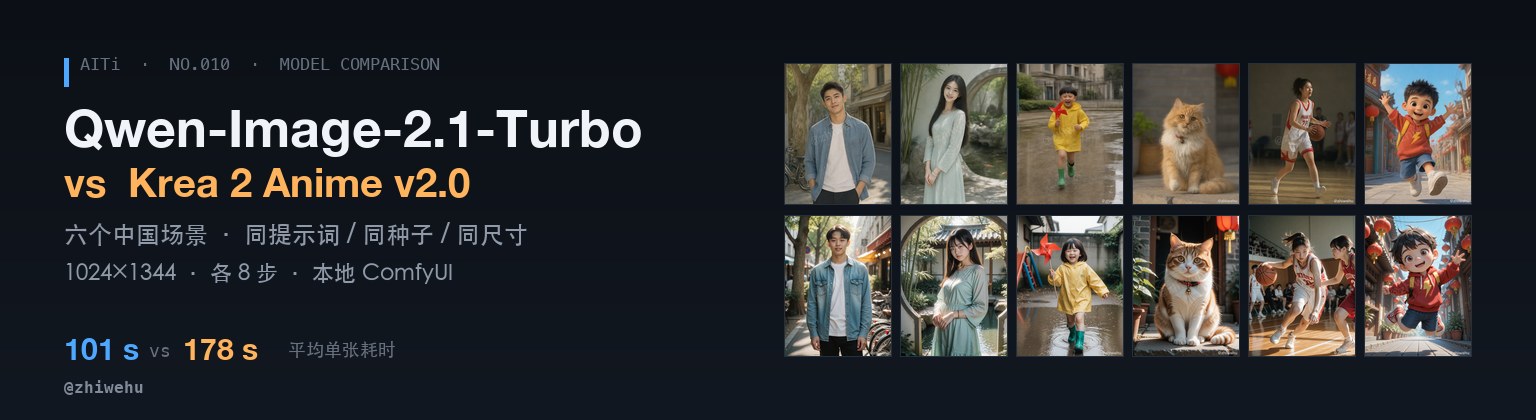
One prompt, one seed, one output size — two image models running on the same Mac, and two completely different ideas of what a picture should look like.
In brief
This weekend I put two local image models on the same table: Qwen-Image-2.1-Turbo (7B DiT plus an 8B text encoder) and Krea 2 Anime v2.0 (a 12.8B single-stream DiT plus a 4B encoder). Same ComfyUI, same set of China-themed prompts, same fixed seeds, same 1024×1344, eight steps on both.
The result is blunt: at default settings Qwen produces a photograph of someone who could actually exist. Krea's foundation is anime, and without a realism LoRA it simply cannot shoot real people. Push the
real_3dslider to 3.5 and the "anime boy" finally turns into "a person".Put simply: Qwen is more real, Krea is more detailed. Hair, catchlights and lighting transitions are visibly more resolved on Krea 2; Qwen wins on skin and the imperfections of a real scene.
The price is speed: 101 seconds per image on Qwen, 178 on Krea — a 1.7× gap. Twelve images, 28 minutes, zero cost, fully offline.
Pin the variables first
The only fair way to compare two image models is to pin the variables: the same prompt, the same seed, the same 1024×1344. That size is home turf for both — Krea 2's native bucket is 1024-class, and Qwen 2.1 defaults to 1008×1344.
Whatever differs after that is the model.
Parameters: tuned until each one works
One caveat before the numbers: this is not a bare-model comparison, but "each tuned until it works." Qwen is good out of the box; Krea needs three quality LoRAs plus the real_3d realism slider before it can compete on the same terms. Krea's timings below carry those four LoRAs — but the A/B later shows the LoRAs add almost nothing; the 1.7× gap comes mainly from the 12.8B DiT.
The two models differ a lot in size: Qwen is a 7B DiT plus an 8B text encoder; Krea 2 is a 12.8B single-stream DiT plus a 4B encoder — one of the main reasons for the 1.7× speed gap.
| Qwen-Image-2.1-Turbo | Krea 2 Anime v2.0 | |
|---|---|---|
| Weights | qwen_image_2.1_turbo_bf16 | krea2Anime_v20_bf16 |
| Text encoder | Qwen3-VL 8B | Qwen3-VL 4B |
| Size | 1024×1344 | 1024×1344 |
| Steps | 8 (fixed sigma list) | 8 |
| CFG | 1.0 | 1.0 |
| Sampler | euler + SigmasFromList | euler / simple |
| LoRA | none | 3 quality LoRAs + real_3d@3.5 |
| Average time | 101 s | 178 s |
Two details worth remembering:
- Qwen's eight steps cannot use a plain KSampler. The turbo sigma list has a very uneven tail (…0.7045, 0.4146); slicing it uniformly with a generic scheduler visibly degrades the image. You have to feed the official values through
SamplerCustom+SigmasFromListverbatim. - Negative prompts are dead at CFG 1. With CFG 1 the negative branch never participates in the computation — Krea wires in a
ConditioningZeroOut, and Qwen's template leaves negative empty. A long negative string is simply not read; if you want to avoid something, describe its opposite positively.
Six scenes: which one looks like a photo, which one like a catalog
The prompt is identical, written in English (both models are steadier in English), seeds matched one to one. All six subjects are fictional Chinese faces in modest clothing.
01 Handsome man · seed 6101
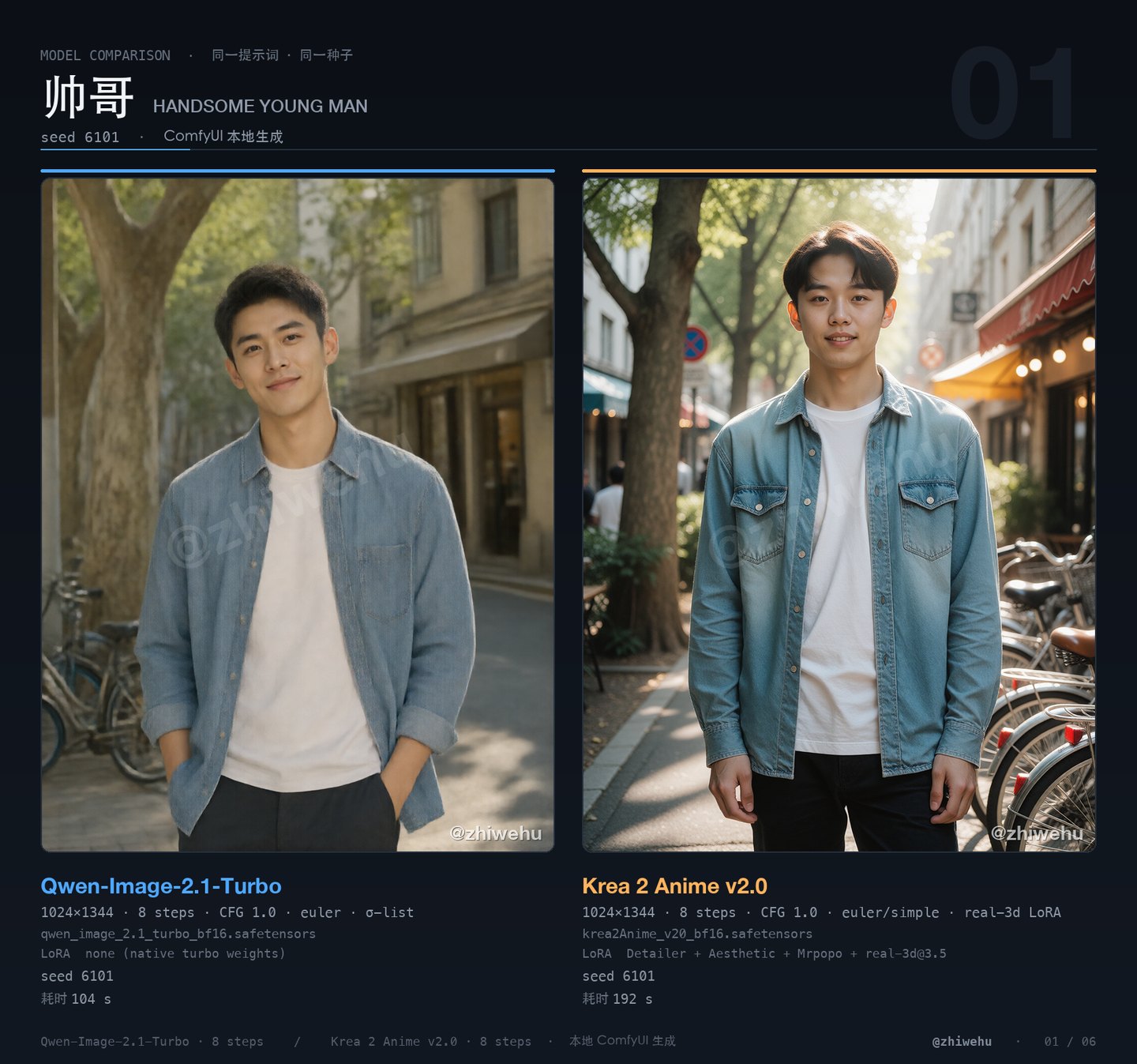
Qwen's looks like street photography: pores, uneven skin tone, loose strands of hair, plane trees and bicycles with real atmospheric depth. Krea's looks like a brand catalog: more "standard" features, flatter skin, but the denim wash and pocket stitching are clearer. Pick Qwen for realism, Krea for polish.
Editorial lifestyle photo of a handsome 23-year-old Chinese young man with short neat black hair, clean-shaven, warm brown eyes and a friendly confident half-smile. He wears a plain white crew-neck T-shirt under an unbuttoned light-blue denim shirt with dark chinos, standing relaxed on a sunny Shanghai side street with plane trees, parked bicycles and a small cafe behind him. Shot on an 85mm lens at f/1.8, soft late-afternoon sunlight, shallow depth of field, natural skin texture, warm neutral color grading, waist-up framing, photorealistic, high detail.
02 Beautiful young woman · seed 6102
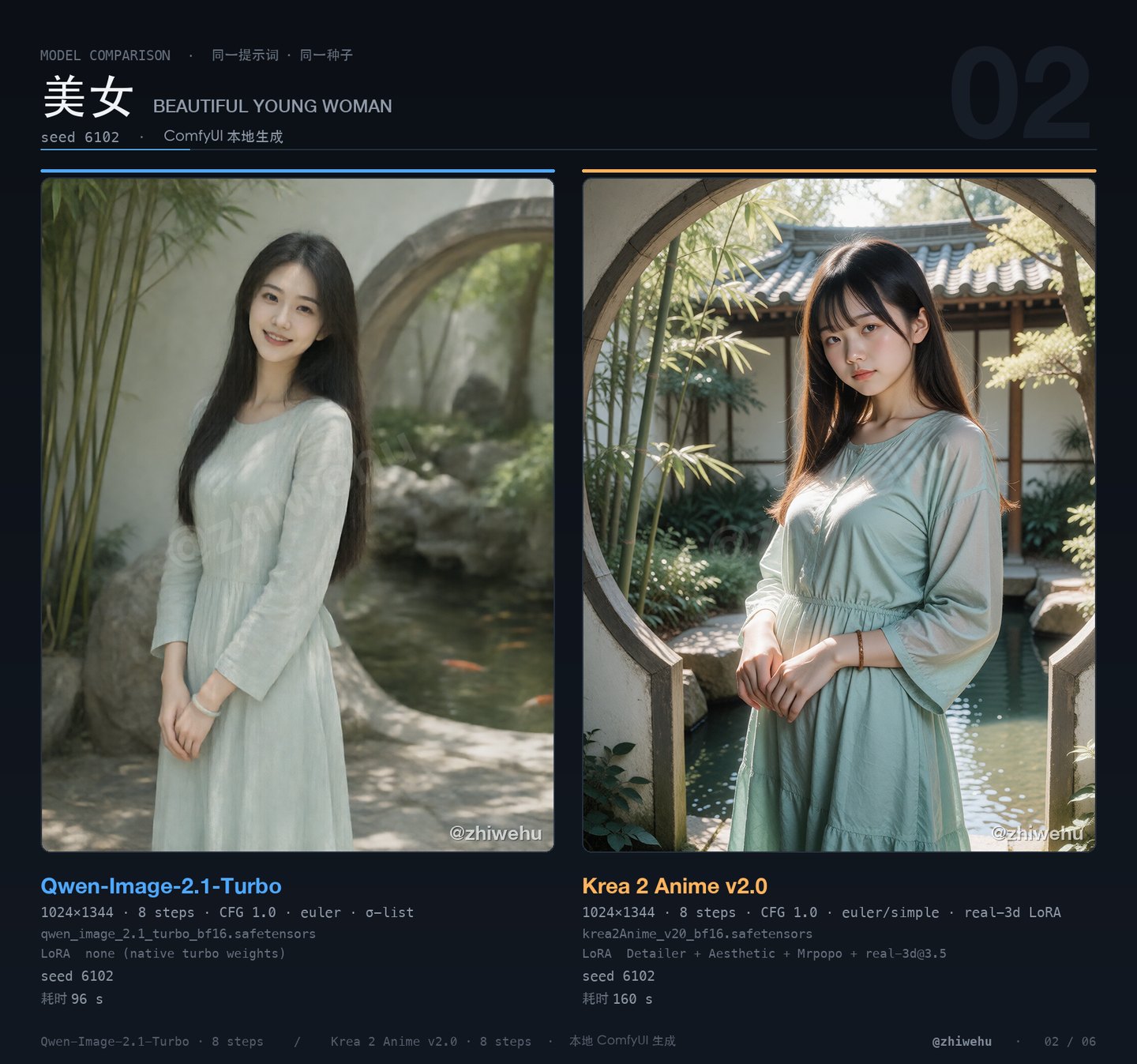
The same line — "moon gate, bamboo, koi pond, 85mm f/2" — and Qwen gives a body turned slightly away, eyes off-camera, soft backlight. Krea turns it into a poster: squarer stance, shallower depth of field, brighter face. Qwen is truer; Krea grabs you first, then starts to feel retouched.
Portrait photo of a beautiful 22-year-old Chinese young woman with long straight black hair and a gentle natural smile, wearing a modest long-sleeved pale mint linen dress with a thin jade bracelet, standing in a classical Chinese garden beside a moon gate with bamboo and a koi pond. Soft dappled late-spring sunlight, 85mm lens at f/2, shallow depth of field, light natural makeup, three-quarter body framing, elegant and fresh, photorealistic, delicate skin detail, refined color grading.
03 Child · seed 6103
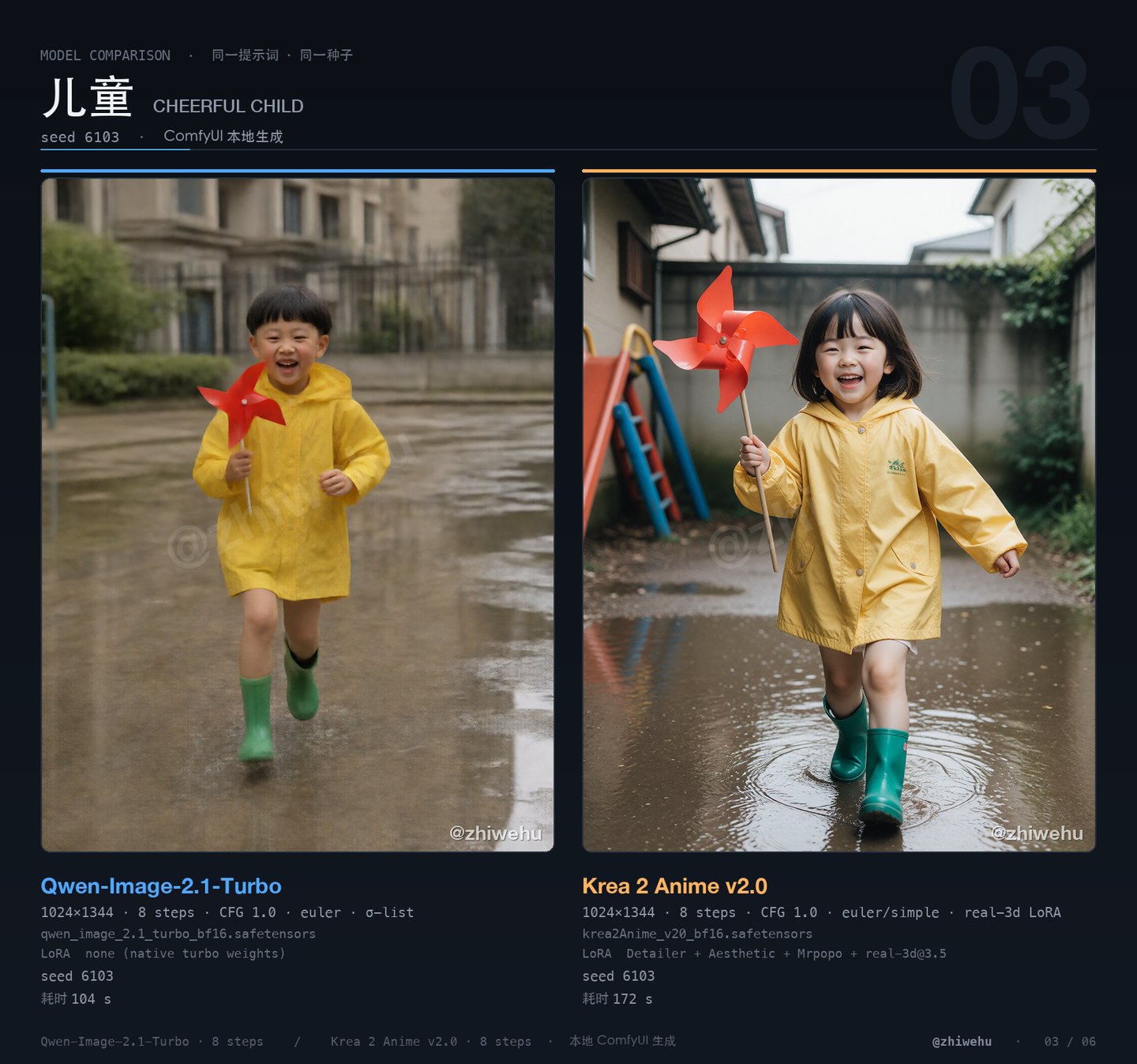
Both are solid. Qwen reads like a parent's snapshot — the plastic sheen of the raincoat and the puddles feel real. Krea renders fabric and folds more clearly, but rounds the face into something closer to a catalog child model. For children, Qwen's naturalness wins.
Candid documentary photo of a cheerful 6-year-old Chinese child with a neat bowl haircut and rosy cheeks, wearing a bright yellow rain jacket and small green rubber boots, laughing while holding a red pinwheel and running through shallow puddles in a neighborhood playground after rain. Soft overcast light, 50mm lens at f/2.2, entire figure visible from head to toe, puddles reflecting the sky, joyful innocent mood, natural colors, photorealistic, sharp detail.
04 Pet · seed 6104
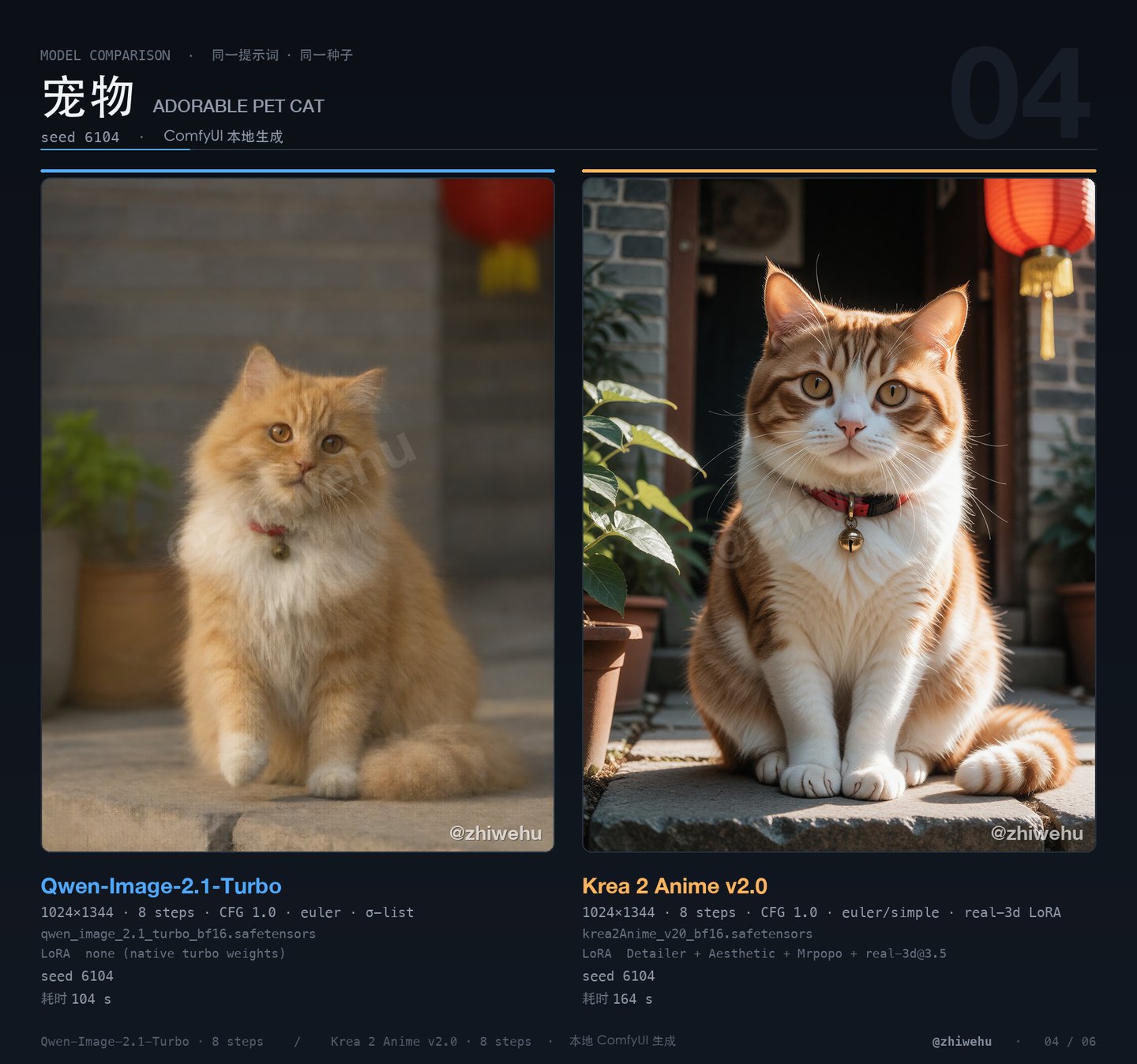
Qwen's fur has more layers and a more natural falloff into the background, with a few whiskers genuinely out of focus. Krea pushes saturation, brightens the eyes, and strengthens the contrast between the red collar and the brass bell — a two-light pet studio. Daily life: Qwen. Portrait session: Krea.
Close portrait of a fluffy orange-and-white Chinese domestic cat sitting on the stone step of a Beijing hutong courtyard, round amber eyes, one white paw lifted, wearing a small red collar with a brass bell. Grey brick wall, potted green plants and a red paper lantern softly blurred behind. Golden-hour side light, 85mm lens at f/2, shallow depth of field, individual whiskers in sharp focus, adorable and alert, photorealistic, fine fur detail.
05 Sports · seed 6105
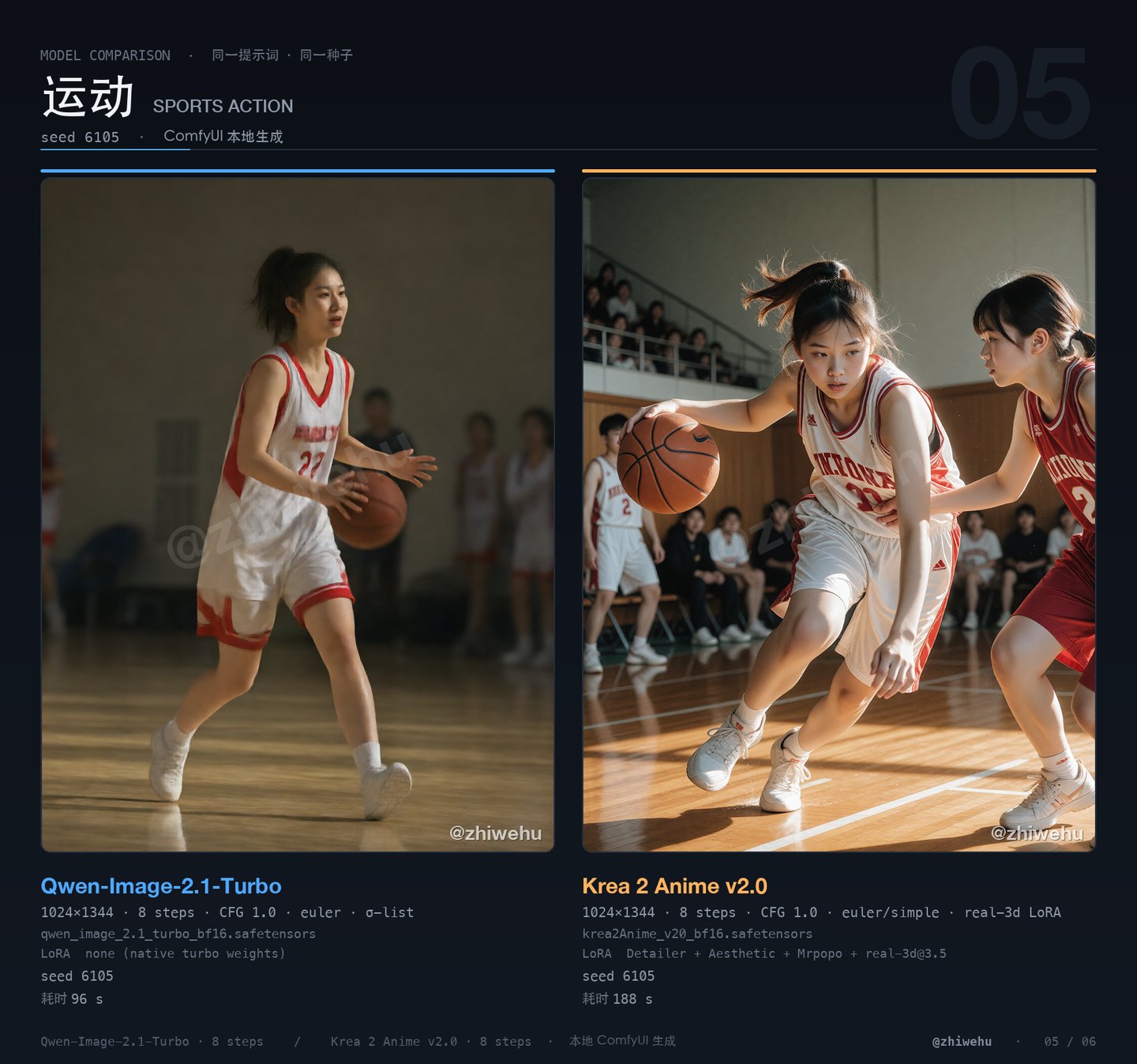
Qwen's framing is looser; the action is correct but the light is flat. Krea's side-backlight, floor reflections, and motion blur carry real sports-photography tension, at the cost of occasionally over-sharpening faces and hands. For action, Krea is more dramatic.
Dynamic action photo of a 22-year-old Chinese female college student with a high ponytail playing basketball, wearing a white and red jersey with knee-length shorts and white sneakers, dribbling past a defender with a focused expression, indoor gymnasium with polished wooden floor, blurred teammates and spectators behind. Fast shutter speed, 70-200mm lens at f/2.8, dramatic side lighting, motion energy, full body visible, healthy athletic mood, photorealistic, crisp detail.
06 Cartoon character · seed 6106
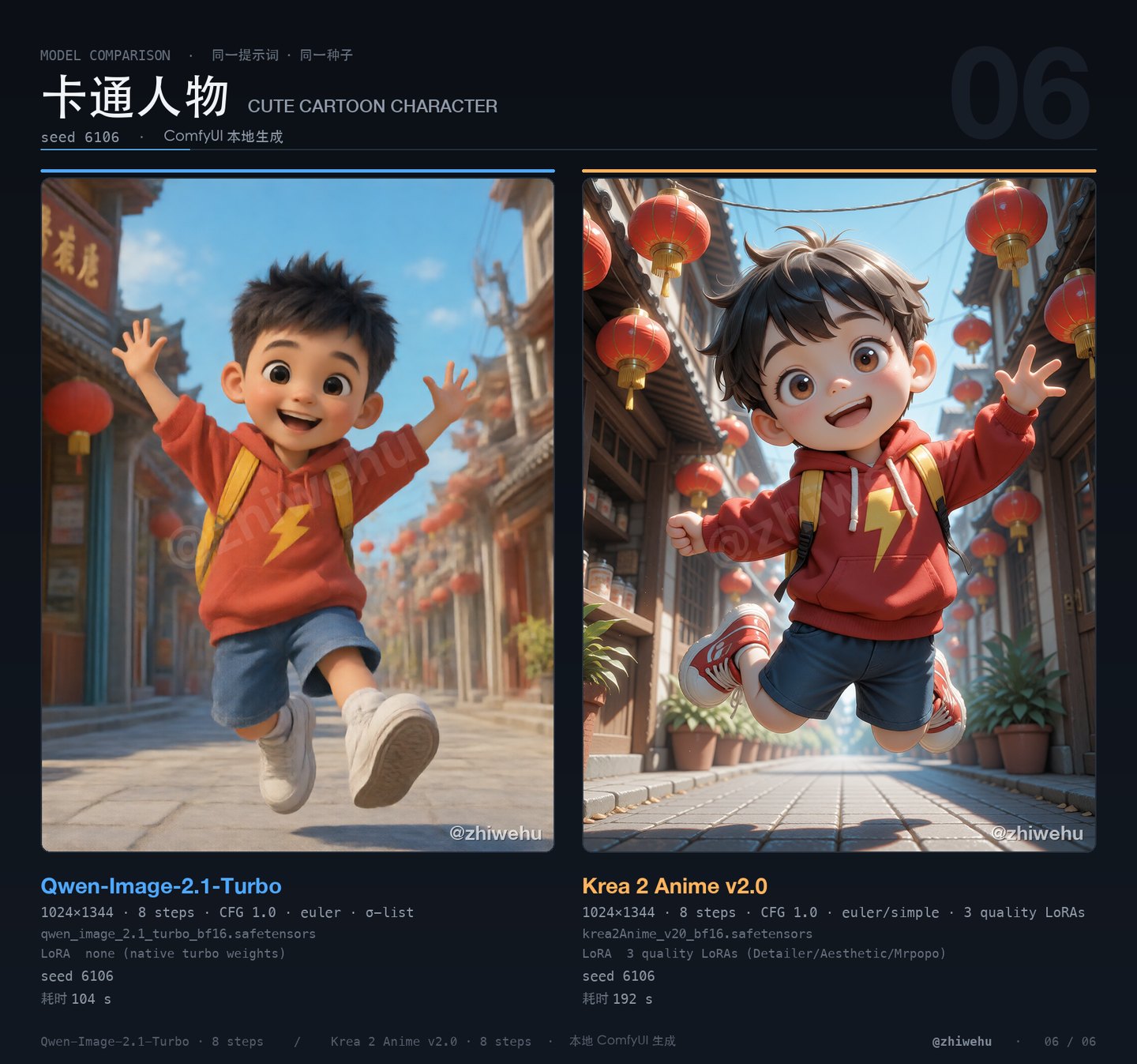
No realism LoRA on Krea here — its anime foundation is exactly what this scene needs. Both deliver a Pixar-flavored 3D kid: Krea's lighting is warmer and the street of lanterns has more depth, while Qwen is cleaner and closer to a poster. For cartoon and anime subjects, go straight to Krea.
Cute 3D animated cartoon character of a Chinese boy about 8 years old, big expressive dark eyes, round friendly face, short spiky black hair, wearing a red hoodie with a yellow lightning-bolt print, blue shorts and oversized white sneakers, jumping joyfully with a small yellow backpack on a bright stylized Chinese street with red lanterns, a noodle shop and blue sky. Pixar-style 3D animation render, soft global illumination, vibrant saturated colors, full body, clean composition, family-friendly, highly detailed.
The short version: Qwen is more real, Krea is more detailed
Across all six scenes, the most stable conclusion is: Qwen looks photographed; Krea 2 looks produced.
Qwen's realism comes from imperfection — pores, uneven skin tone, a few stray hairs, a passer-by the background did not quite blur away. Krea 2 is the opposite: hair falls in clearly drawn groups, catchlights and side-backlight transitions are more resolved, fabric folds are more finished. Zoom in and it simply has more detail; the cost is that the face and the light start to feel retouched.
So this is not "which one has better image quality." It is two ideas of detail: Qwen spends detail on looking real; Krea spends it on looking good.
The realism LoRA: 2.0 is not enough, 3.5 crosses the line
Krea was trained on a million anime images. Give it "85mm portrait" and it still hands you an anime face. Same-seed A/B:
| Setting | Result | Time |
|---|---|---|
No real_3d | Standard anime boy, no skin texture | 184–216 s |
real_3d@2.0 | Semi-realistic; plastic face, looks 3D-rendered | 280 s (incl. first load) |
real_3d@3.5 | Skin, hair and depth of field close to a photo, still flattering | 180 s (model loaded) |
2.0 does not get there; 3.5 does. I did not push further — these sliders have huge scales, and past a certain point color and facial structure start to break.
The cost is basically zero: with the LoRA attached, timing stays in the same band (160–192 s). The bottleneck is the 12.8B DiT, not the LoRA.
The speed bill: 1.7× apart, both acceptable
| Scene | seed | Qwen | Krea |
|---|---|---|---|
| Handsome man | 6101 | 104 s | 192 s |
| Beautiful woman | 6102 | 96 s | 160 s |
| Child | 6103 | 104 s | 172 s |
| Pet | 6104 | 104 s | 164 s |
| Sports | 6105 | 96 s | 188 s |
| Cartoon | 6106 | 104 s | 192 s |
- Qwen is very stable: 96–104 s, ±4% — good for batches.
- Krea drifts more (±10%), and the first image also carries the model load.
- Both models share one ComfyUI, but memory cannot hold both at once; switching evicts the other. Run one model to completion before starting the other — never alternate.
Prompting: three things that actually matter
- Speak like a photographer, not an adjective generator. "85mm, f/1.8, soft window light, shallow depth of field" changes the image more than ten "beautiful, stunning, masterpiece" combined.
- State the framing explicitly. For a full-body shot write "entire figure visible from head to toe"; otherwise you get a bust. Krea in particular was trained on dense captions — the more specific the sentence, the more obedient the output.
- Same seed = reproducible A/B. Same seed, same prompt, change exactly one variable (size, LoRA, steps), and you learn what actually did something.
Which one to use
| You want | Pick |
|---|---|
| "This person exists" photographic realism | Qwen 2.1 Turbo |
| Hair, catchlights, lighting layers when zoomed in | Krea 2 (more resolved detail) |
| Commercial polish, poster lighting, drama | Krea 2 + real_3d@3.5 |
| Anime, cartoon, illustration | Krea 2 (no realism LoRA) |
| Chinese text rendered inside the image | Qwen (far better at type; Krea basically cannot) |
| Batch throughput | Qwen (1.7× faster) |
| Output above 2K | Qwen (native 2K buckets); Krea is native 1024–1536 |
If you can only keep one: keep Qwen for people, keep Krea for style. Both cost about 60GB on disk (Qwen: 13G DiT + 16G encoder; Krea: 24G DiT + 8.3G encoder), and switching costs one model load.
Last: choosing a model is choosing a prior
Put two models on the same table and the interesting part is not who wins, but how far apart their default readings of the same sentence are.
Qwen's default answer is "this person exists." Krea's is "this person has been drawn." A realism LoRA pushes the second toward the first, but not all the way — past 3.5 the face still reads as a picture, not a passer-by.
Local image generation has moved past the quality divide. The real divide is which face you are willing to believe. Keep both because both kinds of belief have users.
A note
All subjects are fictional and conservatively dressed (T-shirts, long-sleeved dresses, jerseys, raincoats); no nudity, no sexual suggestion. Children appear only in bright, everyday scenes. The comparison images carry an @zhiwehu watermark; every image was generated locally in ComfyUI with no cloud API involved.
Subscribe · EMAIL
Get the next essay by email
One original essay a week. Send a short note and you’ll be on the list — or follow the RSS feed if you’d rather not use email.
ONE ESSAY