
Archive / NO.007 · Local AI · Agent · Image Generation · Hands-on Test
No Cloud API — I Built a Fully Local Picture-Book Agent with Qwen-Image 2.1
I moved the language model, the agent, and image generation entirely onto my own machine: how a local agent painted an 8-page cat picture book and a 7-page Japanese-style short manga all by itself.
CONTENTS 13
- 01 I've Been Hacking on Local Image Generation Before
- 02 Here's the Stack I'm Using Now
- 03 What Qwen-Image 2.1 Actually Needs to Run Locally
- 04 Downloading 32GB of Weights Is Harder Than Installing It
- 05 You Barely Need Any Nodes in ComfyUI
- 06 The Hardest Part of a Picture Book Is Still the Character
- 07 Only Now Comes the Agent
- 08 How Slow Is Local Generation, Really?
- 09 Why I Still Want to Keep It Local
- 10 Plenty of Problems Remain
- 11 What I Want to Build Next Isn't Just Picture Books
- 12 Test Environment
- 13 References

At a glance
- I built a fully local picture-book production line: DeepSeek Harness + local LLM → dsh-image-gen → ComfyUI → Qwen-Image 2.1 — no cloud image API, no per-image billing.
- Two finished books came out of it: the 8-page animal picture book Miso and the Moon Market, and the 7-page Japanese-style short manga BLOOM.
- Character consistency doesn't come from hammering the character into the prompt; it comes from a visual anchor: generate one character sheet first, then ship it in as a reference image on every page.
- Speed is the biggest weakness of this approach right now: 1536×864 at 15 steps takes about 126 seconds per image. It's built to be handed to an agent and left running in the background, not to be waited on.
- The weights are under the Qwen Research License; check the terms separately if you plan to use this commercially.
AI image generation stopped being news two years ago.
If you just want a nice-looking image, cloud models are now the easy path. People, scenes, text, editing from a reference image — even character consistency, which used to be a pain — have all improved a lot. So what I wanted to test this time wasn't whether AI can make a picture book.
What I'm actually interested in is something else:
Can the whole stack move onto your own machine — and not just installing an image model on the laptop, but actually letting a local agent write the story, design the characters, generate page after page, and assemble a finished picture book?
No cloud image API, and no paying per generation.
A few days ago I got this basically working end to end.
One of the books is called Miso and the Moon Market.
The protagonist is a small black cat wearing a red scarf. The story starts at a lighthouse on the coast, follows Miso up a staircase made of clouds to the moon market, and ends with Miso helping a little star that fell out of the sky. The finished PDF is a cover plus 8 pages, and the characters, palette, and art style basically held together.
The image at the top is one of those pages: Miso holding the little star on the cloud staircase, with the moon market and the lighthouse off in the distance.
Then I went for a completely different style and made BLOOM, a 7-page Japanese-style short manga. This time it wasn't an animal story: a fixed human character, multi-panel storyboards, speech balloons, and a fairly continuous emotional arc.
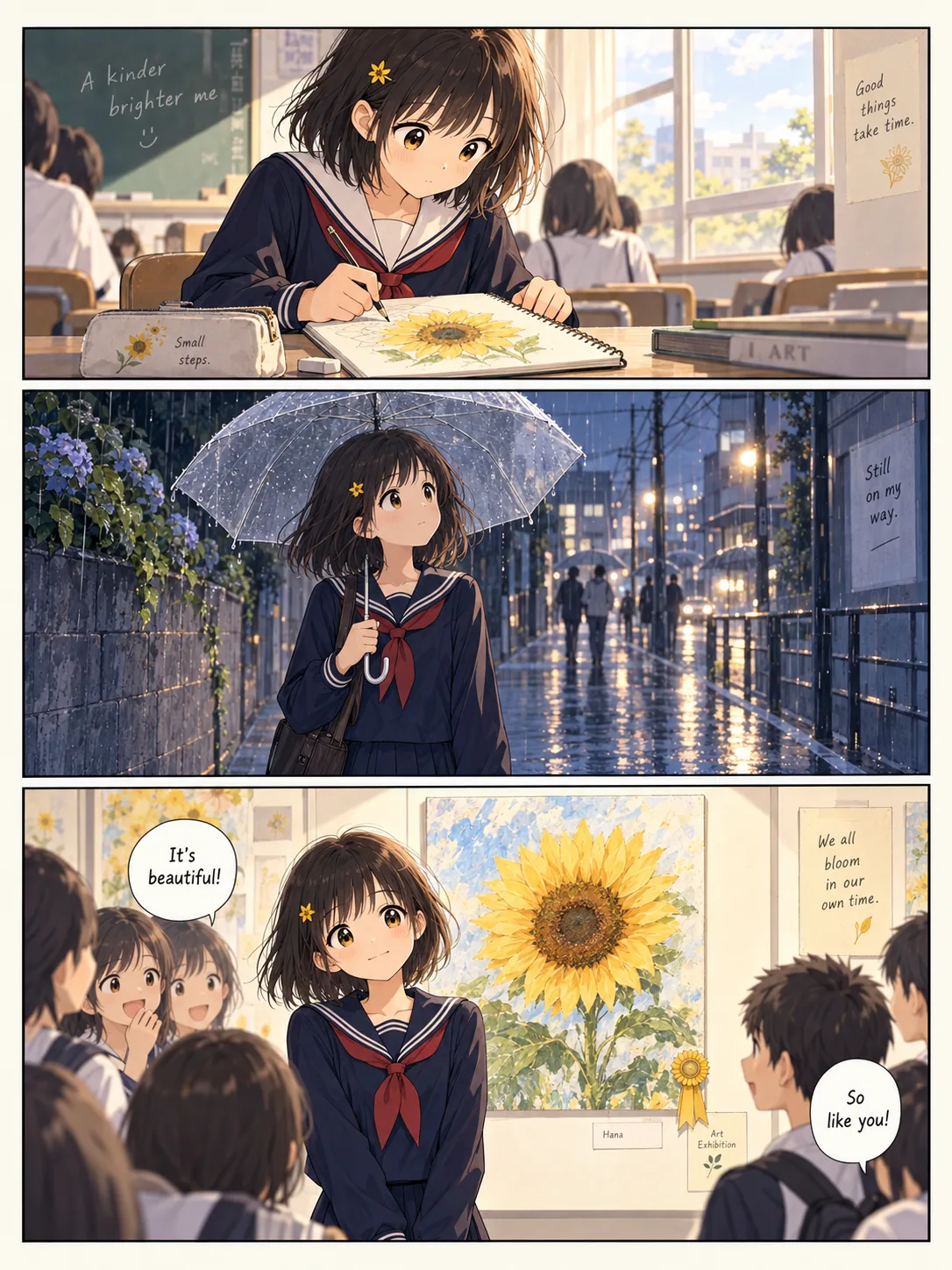
Figure: An interior page of BLOOM. Those three panels on one page are also the hardest part of this whole pipeline: a fixed character, a continuous emotional arc, and dialogue text on top of it.
Neither of them is remotely publication-grade, obviously. Some of the text needs proofreading, and the characters aren't 100% consistent under complex camera angles. But for me, the interesting part of this experiment is no longer whether the pictures look good.
It's that from the moment I type in a requirement, an agent can take it from there.
I've Been Hacking on Local Image Generation Before
I bought this machine in 2024, and one of the first things I installed was Stable Diffusion.
By then text-to-image could already produce genuinely good images. But the moment you actually start fiddling, you fall straight into a pile of technical details. Want to lock a character? You end up studying reference images, seeds, and ControlNet. Want a specific art style? You go hunting for checkpoints and LoRAs. The pose comes out wrong, the hands come out wrong, the expression comes out wrong — so you keep swapping parameters.
None of that technology is wrong, and honestly a lot of it is fun. What I never liked is the state it puts you in: to draw one picture, a human first has to become half an "image-generation engineer."
The interface I actually wanted was always natural language.
I say what I want, and the model handles as much of the rest as it can.
In February and March 2025 I ran an online AI class, and one module of it was about teaching people to use n8n to wire an LLM to a cloud image model and make picture books.
That run solved a lot of problems, actually.
The LLM writes the story, splits it into pages automatically, generates a prompt for each page, and n8n calls the image API in order. Work that used to mean copying and pasting by hand dozens of times became, for the first time, a workflow that could run on its own.
But it was still a pipeline designed up front, and the images were still generated in the cloud. Every generation costs money; the character isn't right, generate another; the composition is off, generate another. On a book of a dozen-odd pages, try a few versions per page and the image count climbs fast.
This time I wanted to push one step further: the language model, the agent, and image generation — keep all of them local, as far as possible.
From Stable Diffusion to n8n to today, what actually changed isn't the model. It's where I stand. Before, I operated the software and made images one at a time. Now I hand the agent a task, and every so often I check in on how far it's gotten.
Here's the Stack I'm Using Now
The architecture isn't complicated.
User
  ↓
DeepSeek Harness + local LLM
  ↓
dsh-image-gen
  ↓
ComfyUI
  ↓
Qwen-Image 2.1
  ↓
Images
  ↓
Layout script
  ↓
PDF
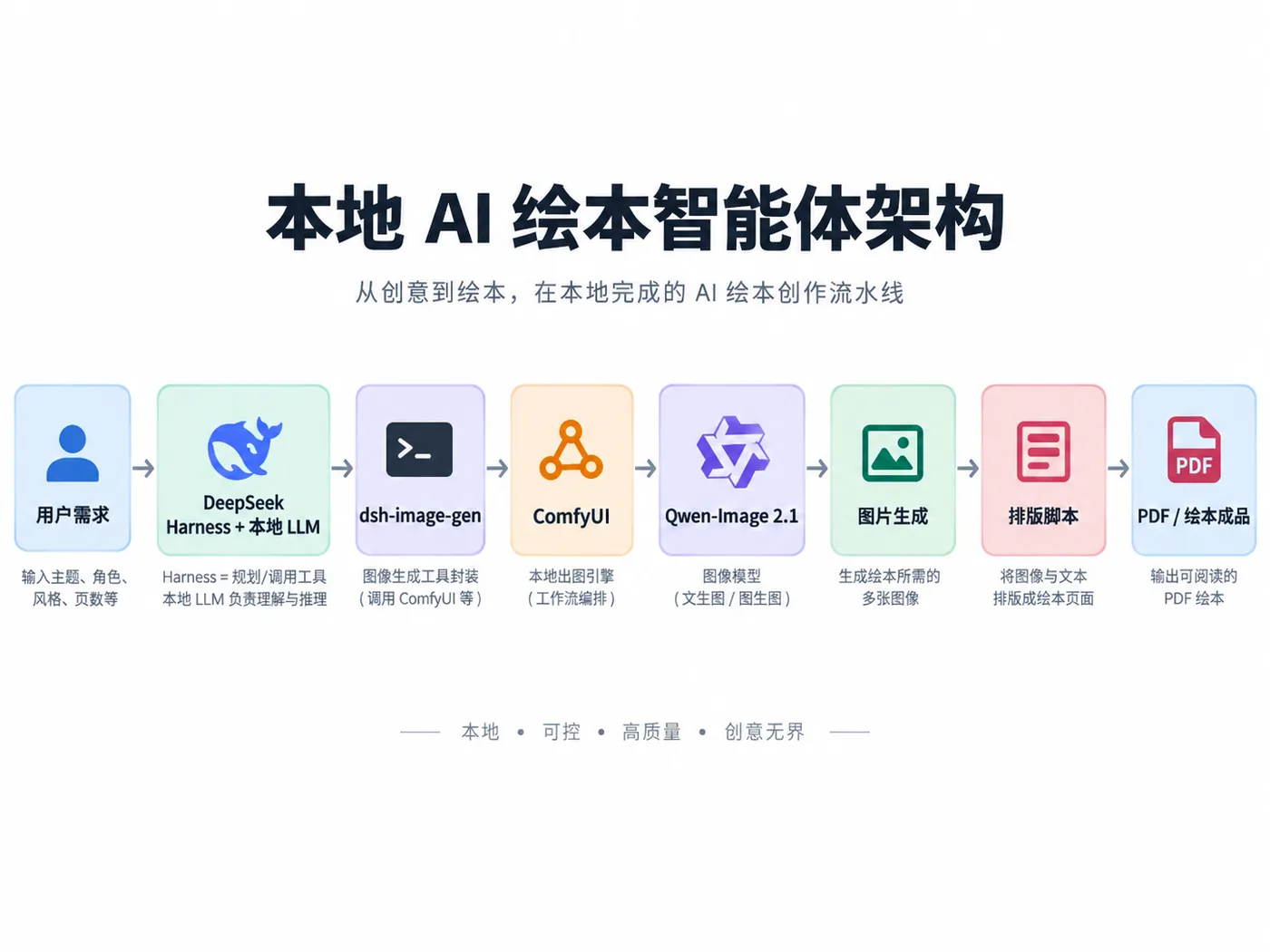
Figure: How DeepSeek Harness, dsh-image-gen, ComfyUI, and Qwen-Image 2.1 fit together.
At the top sits DeepSeek Harness. This time I plugged in a locally running Qwen3.8-27B — that's the 27B dense model I wrote about in issue 006, with the full hands-on test here. It handles understanding what I want, writing the story, splitting it into pages, and deciding when to reach for the image tool.
The dsh-image-gen plugin in the middle is the small piece that makes it work, and I wrote it myself: it registers capabilities like generate_image and edit_image as tools the agent can call directly, then calls local ComfyUI underneath. Without it, the agent can only say what it wants to draw — it can't actually get the image onto disk.
And at the very bottom is Qwen-Image 2.1, the thing that actually draws the picture.
Which means I barely touch ComfyUI directly these days.
ComfyUI is still there, and the node workflow is still there. It's just gradually slid from "the app I face every day" into the background, where it becomes a local image engine that serves an API. DeepSeek Harness deals with me; ComfyUI does the work.
I think that layering matters.
Most of the time when we say "an agent uses tools," it sounds a bit abstract. Dropped into this example it gets very concrete: the agent never has to learn to click through ComfyUI's dozens of nodes. It only needs to know when it should call generate_image, and when it should call edit_image with a reference image attached.
The complexity underneath gets packaged away.
That's exactly why I like the Harness approach more and more.
What Qwen-Image 2.1 Actually Needs to Run Locally
Qwen-Image 2.1 isn't a single-file download.
The BF16 build I actually used has three main parts:
| Component | Size | Purpose |
|---|---|---|
| 7B DiT | 14.23GB | The image generator proper |
| Qwen3-VL 8B | 17.53GB | Text encoding, reference-image understanding |
| VAE | 0.68GB | Image encode/decode |
| Total | 32.44GB |
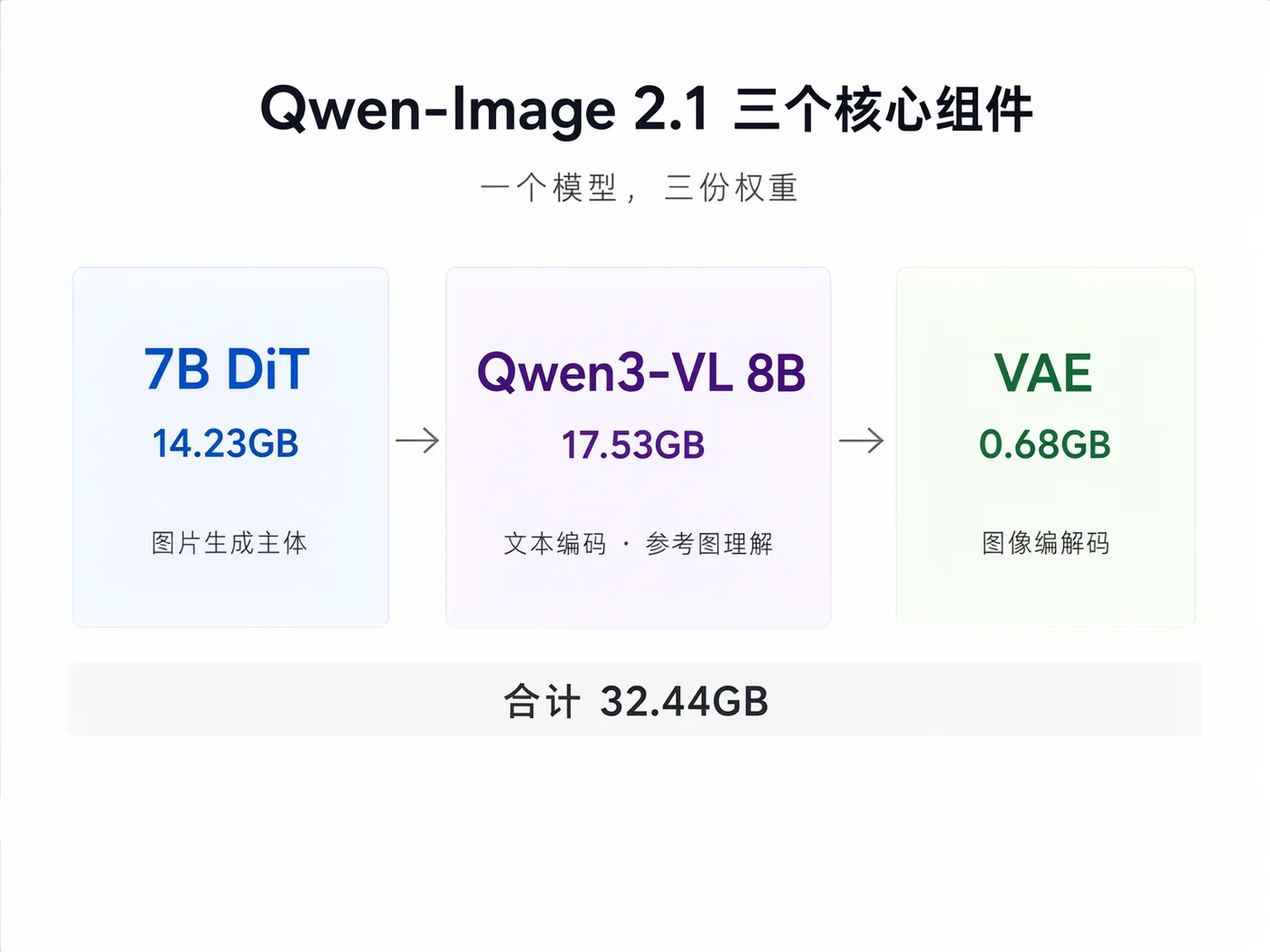
Figure: Three weight files, 32.44GB in total, dropped into ComfyUI's diffusion_models / text_encoders / vae directories.
The model itself is a single-stream DiT with Flow Matching, natively supports higher-resolution output, and also handles reference-image editing. The piece I care most about here is that middle Qwen3-VL 8B, because when I moved on to the picture book, character consistency depended on it, heavily, for how it handles reference images.
My test environment is a MacBook Pro M4 Max 128GB, though this article isn't really about Macs.
It's just the machine that happened to be on my desk.
The one thing to watch on Mac is that this time I went straight to BF16 instead of the repo's int8_convrot or w4a8. Those last two target CUDA kernels, and MPS gets no corresponding speedup from them. In my later hands-on tests, the int8 version was actually 8%–15% slower than BF16.
If you're on an NVIDIA card, that conclusion can't just be copied over: there, int8 / fp8 quantization does get real hardware acceleration and VRAM usage drops noticeably, so it's usually the first choice. Which build you should end up on for different hardware depends on the specific runtime.
Installing ComfyUI itself is easy these days. I used ComfyUI Desktop directly, with the models placed in:
diffusion_models/
text_encoders/
vae/
What actually cost me some time was the version and the model directory instead.
The Homebrew Desktop build was still fairly old when I installed it, so I had to let the app update itself until the backend reached the version containing the TextEncodeQwenImage21 node. Also, in the new Desktop the shared model directory is already:
~/ComfyUI-Shared/models/
not the ~/Documents/ComfyUI you find in a lot of older tutorials online.
The local service runs on 127.0.0.1:8188.
None of this is technically hard, but it's usually where the time goes. Thirty-odd gigabytes of models downloaded perfectly, and ComfyUI still won't see them — turns out you just had the wrong directory.
Downloading 32GB of Weights Is Harder Than Installing It
The single biggest time sink in this deployment wasn't the setup. It was the download.
I tested a few sources.
A direct Hugging Face connection was basically unusable — through a proxy I measured around 220KB/s. hf-mirror ranged from tens of KB all the way to 1MB/s. I finally switched to ModelScope, where a single connection reached about 17MB/s, and roughly 33MB/s with two connections in parallel.
The three BF16 files finished downloading in about 20 minutes.
And ModelScope already hosts the ComfyUI-format build of Comfy-Org/Qwen-Image-2.1, so there was no weight conversion to do myself.
I didn't really want to write about this kind of detail, but if someone actually follows this article to set it up, it's worth leaving in. Deploying open models inside China right now, the hardest step is often not inference — it's getting several dozen gigabytes onto your disk intact.
I later also verified the safetensors file headers, dtypes, data offsets, and official sizes. All three files were BF16, and their lengths matched the repo. For weights running to tens of gigabytes, I think that check is worth doing — otherwise when it fails at the end, it's very hard to tell whether it's the environment or a file that got corrupted halfway through the download.
You Barely Need Any Nodes in ComfyUI
Take the official workflow apart and the core is less complicated than you'd think.
CLIPLoader
    ↓
TextEncodeQwenImage21
    ↓
KSampler
    ↓
VAEDecode
    ↓
SaveImage
On top of that, wire UNETLoader into the KSampler and use EmptyLatentImage as the initial latent.
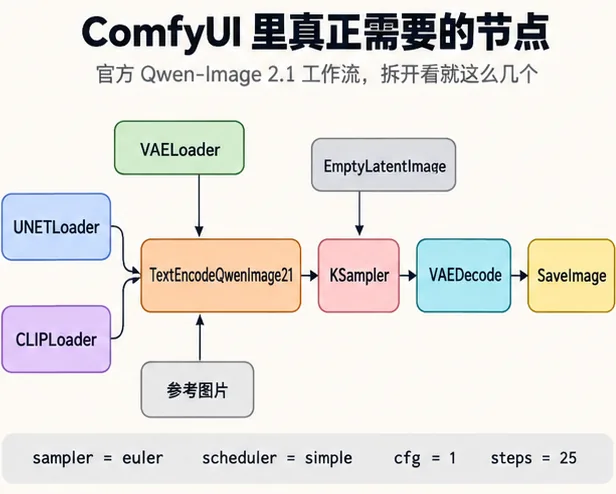
Figure: The official Qwen-Image 2.1 workflow taken apart — the core really is just these few nodes.
I left the official defaults almost completely untouched at first:
sampler   = euler
scheduler = simple
cfg       = 1
steps     = 25
Here's one thing that differs from your old Stable Diffusion habits: leave CFG at 1.
Qwen-Image 2.1 already handles guidance during the text encoding stage. If you keep pushing CFG up in the KSampler on top of that, you're effectively applying a second layer of guidance. In my tests, once CFG went to 2.5 and I started using a negative prompt, generation time got noticeably longer.
That took some getting used to at first.
When you were tuning image models before, your instinct was usually "the prompt isn't obeying — is CFG still too low?" This time, writing the prompt clearly itself matters more.
The Hardest Part of a Picture Book Is Still the Character
If every page is generated from scratch out of text, the character still drifts — even with models as good as today's.
So Miso and the Moon Market doesn't have the agent redescribing Miso on every call:
"a black cat wearing a red scarf"
I generated a standalone character sheet for Miso first.
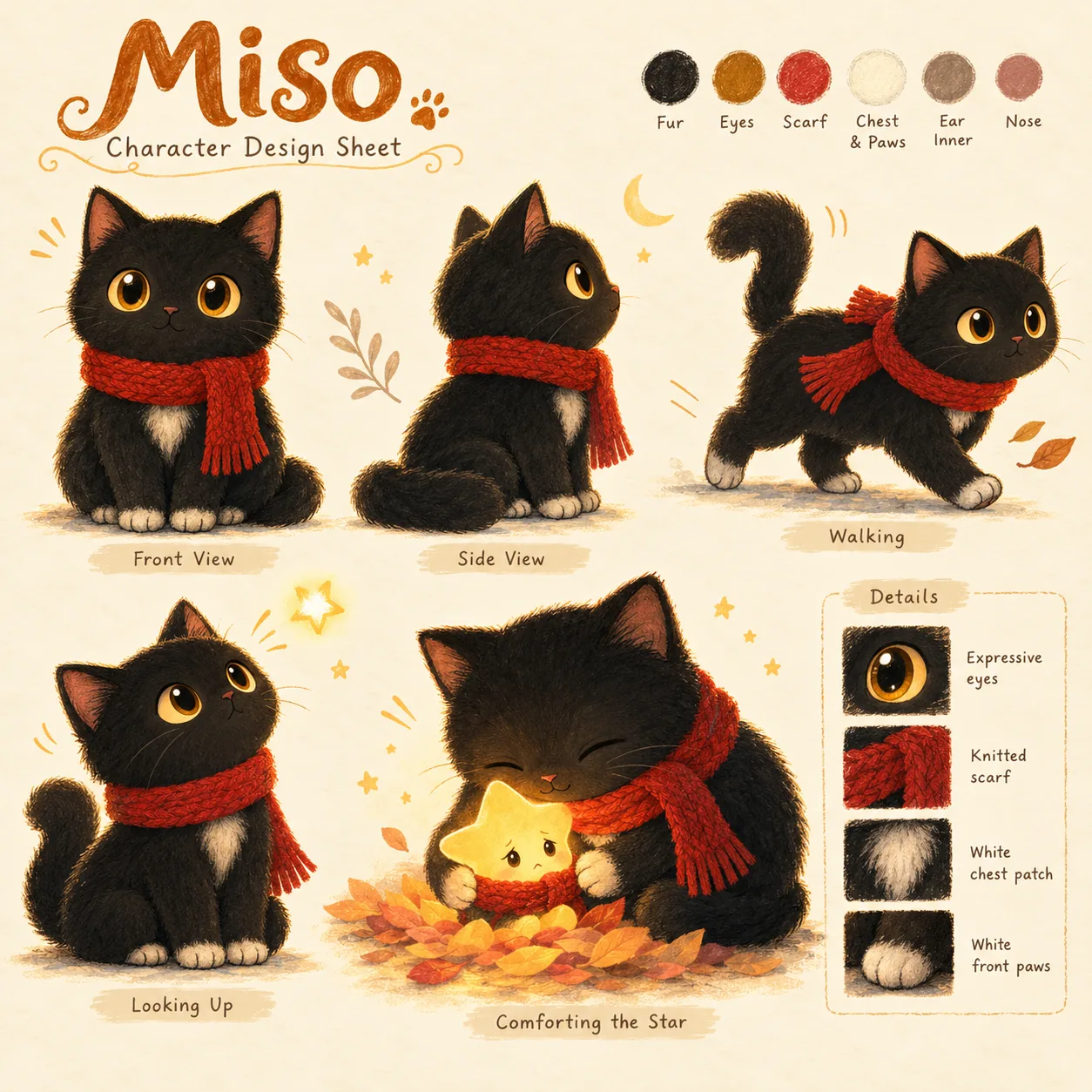
Figure: A character sheet compiled from the finished Miso design, illustrating the concept of a visual anchor.
Black coat, amber eyes, a white patch on the chest, a red scarf — those traits get locked down first. Then, on every later page, the image goes in as a Reference Image alongside the prompt.
So the new prompt mostly describes what changed, for example:
"Standing on the cloud staircase, looking back."
"Arriving at a stall in the moon market."
"Holding a small glowing star close."
Instead of redefining Miso from zero every single time.
Inside ComfyUI, the reference image feeds into TextEncodeQwenImage21, and you also need to wire the VAE in so the reference image gets encoded first and only then enters the conditioning.
This is, I think, the important idea for producing continuous content right now:
Don't count on the model remembering the character from the prompt.
Give it a stable visual anchor.
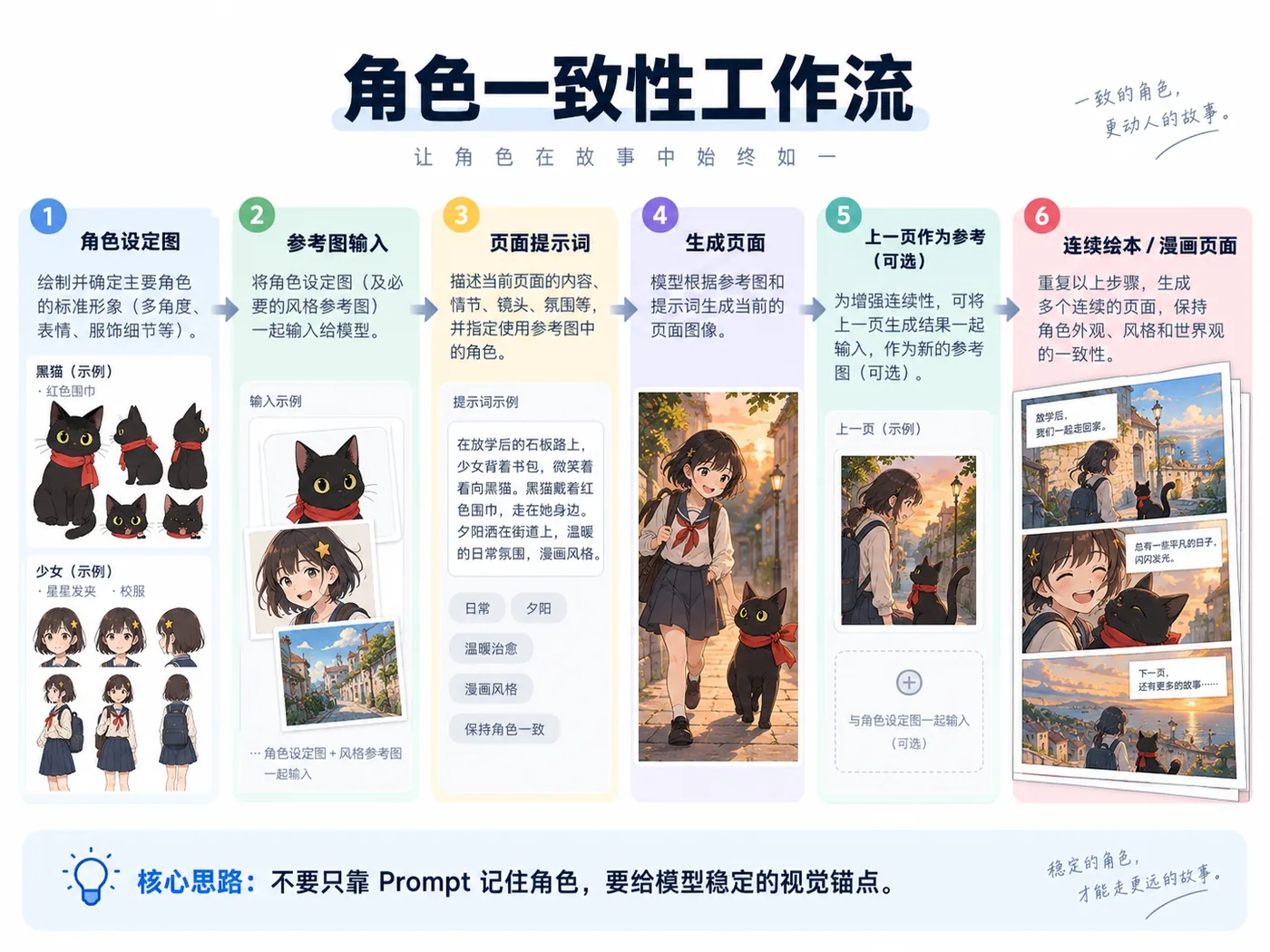
Figure: character sheet → reference image → page prompt → consecutive pages.
If two pages continue the same scene, you can go further and feed the previous page in as a reference as well. The character sheet tells the model who the character is; the previous page tells it what happened one second ago.
Qwen-Image 2.1 natively supports multiple reference images, which leaves a lot of room for serialized comics later on.
BLOOM was my second, different attempt at this. Swapping the cat for a human pushed the consistency requirement noticeably higher: hair, eyes, hair accessories, uniform — change any one of them and the human eye catches it immediately.

Figure: A human character sheet compiled from the protagonist of BLOOM.
The final result isn't perfect, but it at least confirmed to me that this method isn't only good for animal picture books.
Only Now Comes the Agent
If you stop at the step above, it's still an ordinary ComfyUI workflow.
What made me feel this was actually starting to get interesting was plugging it into DeepSeek Harness.
The workflow inside dsh-image-gen is still ordinary JSON at heart. All I had to do was leave a few injection points:
"prompt": "{{prompt}}",
"seed": "{{seed}}",
"image": "{{image}}"
The agent doesn't need to know KSampler's node ID, and it doesn't need to understand how the VAE is wired.
It only needs to know what this page should show, then hand the prompt to the tool. If it wants to hold the character consistent, it attaches a reference image too. The plugin is responsible for filling all of that into the workflow and posting it to ComfyUI's /prompt API.
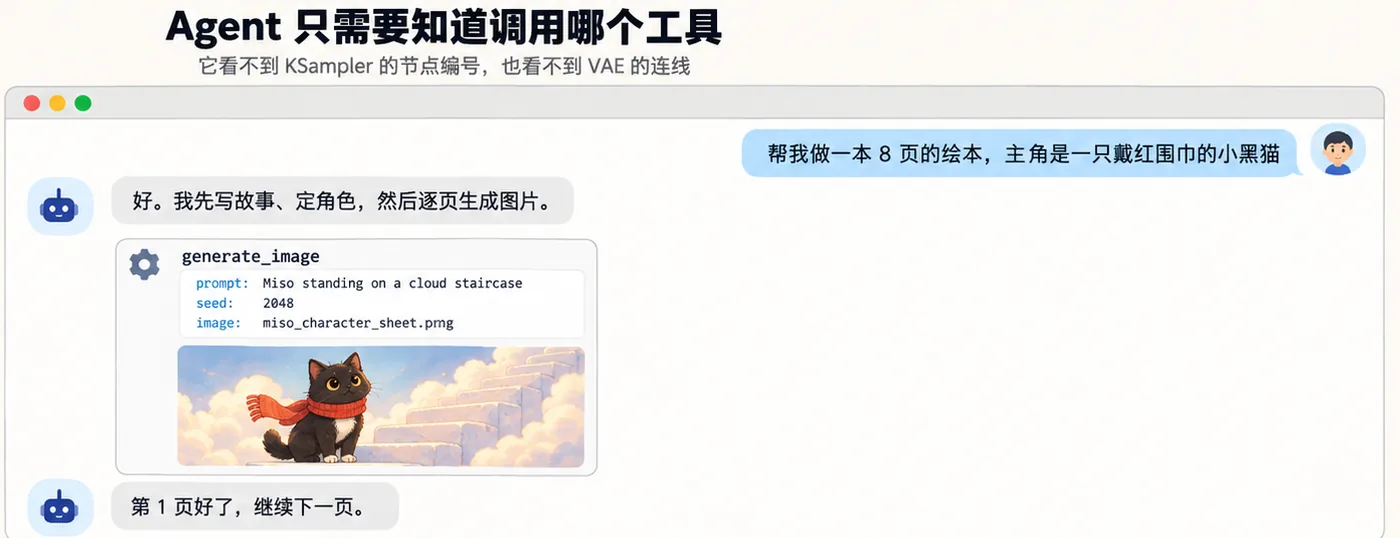
Figure: What the agent sees is just "which tool to call, which arguments to pass" — never the node graph underneath.
So the making of the whole book becomes:
Write the story.
Lock the page count.
Design the characters.
Generate the character sheet.
Break the story into pages.
Assemble an image prompt for each page.
Generate page by page, with the character reference attached.
Once all the images are done, a short piece of Python lays the text and the pictures together and outputs a PDF.
My typesetting code in this version came to about twenty lines, using PIL.
Of course, this still isn't a product where you press a button and walk away.
I still watch the output while it generates. Some pages have weak composition, some poses I'm not happy with — I tell it to do it again. Text especially needs checking: Qwen-Image 2.1 can already paint words directly into the balloons, but numbers and rare characters can still come out wrong, and real publication absolutely cannot skip human proofreading.
But the way I work has genuinely changed.
Before, I drove the image-generation software and made them one at a time.
Now it's more like handing the agent a task, checking in every so often on how far it's gotten, and telling it what to change when something's off.
Honestly, that feels a lot like writing code with local models these days.
How Slow Is Local Generation, Really?
This was the thing I was most worried about at the start.
If a single image takes twenty or thirty minutes, then "local is free" means very little, because no human can wait that long.
I ended up testing mostly at 1536×864. With the model warm, 25 steps at CFG=1 takes roughly 235–293 seconds per image.
Later I dropped Steps down to 15.
About 126 seconds per image.
That's nearly twice as fast as 25 steps, and when I actually looked at the generated results, the quality loss wasn't obvious. So for day-to-day testing, 15 steps has become my more common setting. Dropping to 10 steps can still get you to about 118 seconds, but the gain is already small, because the fixed cost of model preparation up front accounts for a big share of the time.
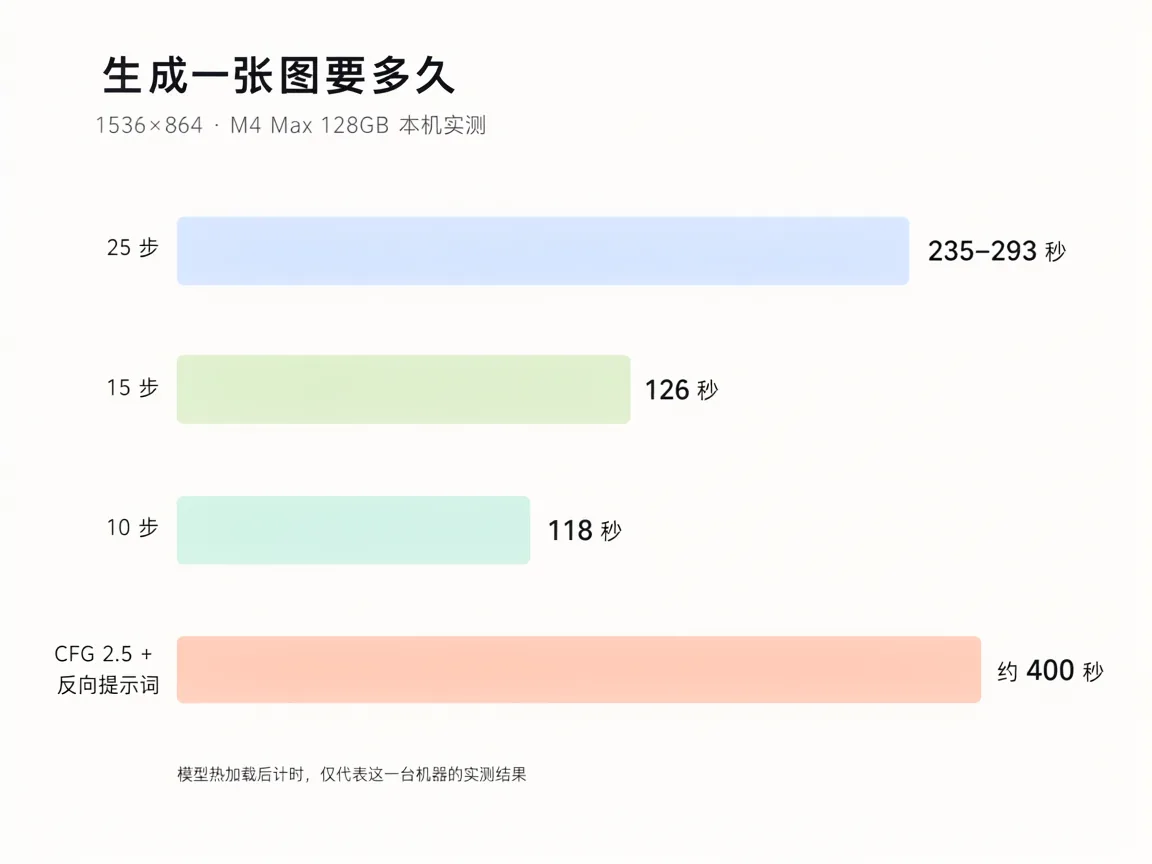
Figure: Hands-on measurements on this machine at 1536×864 with the model warm, on an M4 Max 128GB. This one machine only.
Reference-image mode is slower still.
Because the character image has to go through a pass of Qwen3-VL's visual encoding, each image can cost an extra minute or two. In my setup I launch ComfyUI with --gpu-only, which moves the encoder off the CPU and onto MPS, and that helps a little.
So this approach is not fast.
At least today, it isn't fast enough for me to sit there and watch images appear one after another in real time.
But change how you use it and I find the speed acceptable.
Let the agent run it slowly in the background. I go do something else, and come back later to check.
Which is not the same thing as the "tens of tokens per second" experience you chase with a chat model.
Why I Still Want to Keep It Local
If you only need three or five images every once in a while, I wouldn't tell everyone to spend time setting this up.
Opening a cloud service, typing in a prompt — that's probably the more sensible choice.
The value of local only slowly appears once you're generating in volume.
A picture book is a perfect example. One page might come out great, or it might take three tries; ten pages is thirty images. Add a character sheet, a cover, and backup compositions, and it's easy to hit fifty.
More importantly, an agent doesn't get stingy about hitting "regenerate" the way a human does.
Give it enough authority and it can fail, revise, and try again. For an agent, a large amount of trial and error is simply a normal way of working.
But if every trial-and-error cycle sits behind a cloud API charge, you'll instinctively want it to "try fewer times."
A local model is a different situation.
Once the model is downloaded, one more generated image adds compute time and a bit of electricity — not another API call fee.
Those two cost models end up influencing how you design the agent: one is a curve with a high upfront investment and near-zero marginal cost afterwards, the other is a pay-as-you-go straight line. Only the first can support an agent that's willing to fail repeatedly.
There's another reason: data.
For an ordinary picture book it may not matter, but this setup won't necessarily only be used for Miso.
Unreleased characters at a company, product design drafts, client assets, photos of your kids, even internal storyboards — any of it could become a reference image. If all of that can stay local, from the language model all the way down to image generation, there's one fewer layer of worry about where data should be sent.
I think this may be the longer-term value of local image models.
It isn't about proving that "my computer can draw too."
It's that once image generation becomes one of an agent's tools, we want that tool to be like the local Python, the file system, the database: always there, callable whenever we need it.
Plenty of Problems Remain
After finishing those two examples, I didn't come away thinking "AI manga is solved."
If anything, the problems got clearer.
First, it's still consistency.
The character sheet solves most of the problem, but with complex action, multiple characters, or big camera moves, drift still happens.
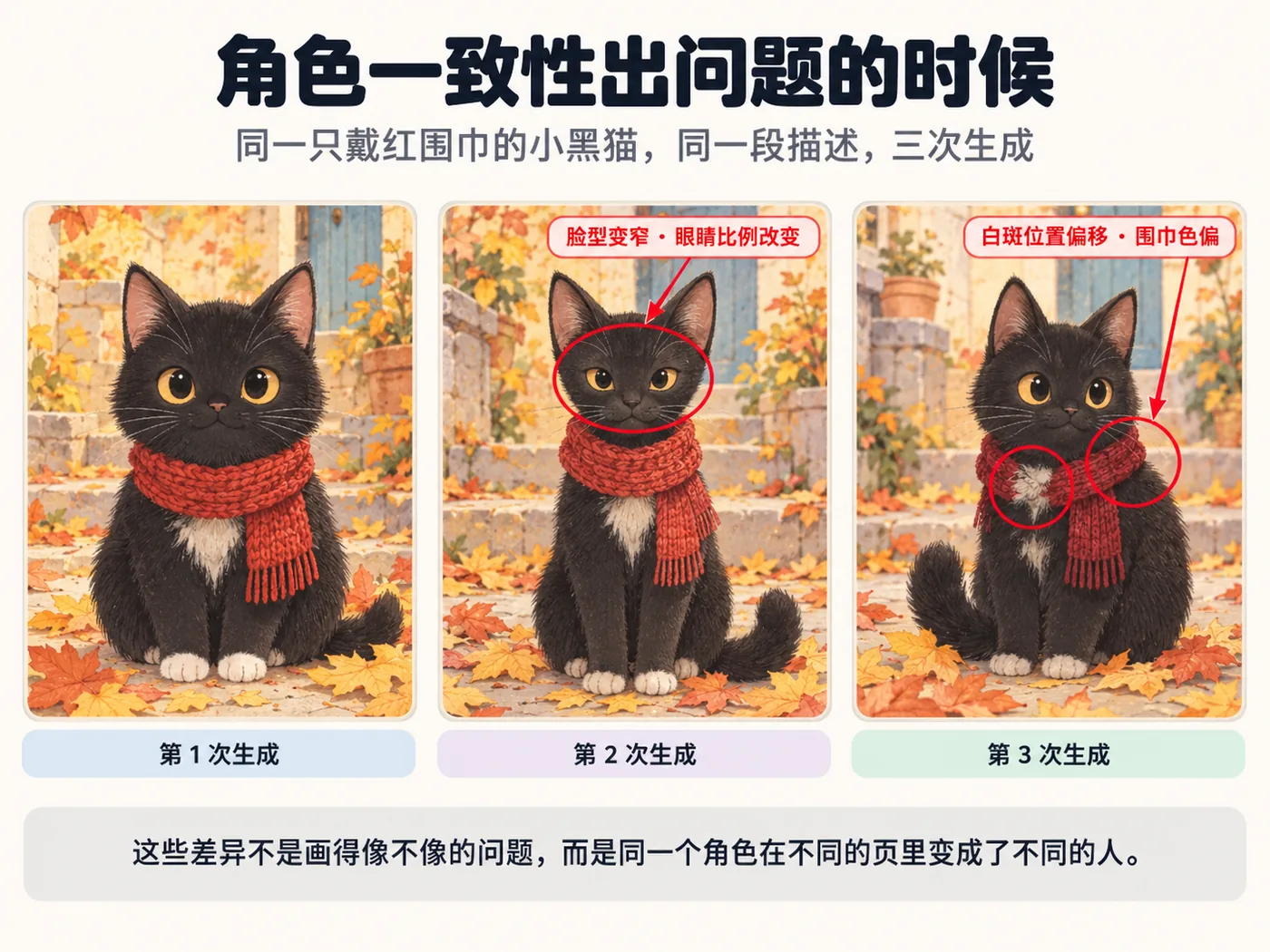
Figure: The same cat, the same description, three generations. A character sheet solves most of the problem, but not all of it.
If the LoRA toolchain around Qwen-Image 2.1 matures later, I should try training a dedicated LoRA for a fixed character.
Second, text.
Generating simple English dialogue directly is already fairly usable, but for real Chinese comics or actual publication, I'd still rather have the model generate the balloons and the artwork, then typeset the text separately. That way it can be edited, and you avoid repainting an entire page because of one wrong character.
Third, there's speed.
Two or three minutes per image is acceptable in a background-agent scenario, but it's still a long way from real-time interaction. A ten-page picture book with several candidate versions per page still adds up to a long total time.
And there's one more thing you can't ignore: the Qwen-Image 2.1 weights I used this time are released under the Qwen Research License. So right now I treat it as a technical experiment. When it comes to commercial publishing, paid products, or paid services, you need to separately check the model's latest license terms and the scope of what's permitted.
This is exactly what I've become especially careful about after spending the previous few days researching whether AI-generated comics can actually be sold.
What I Want to Build Next Isn't Just Picture Books
Now that it works, oddly enough, I don't especially want to keep mass-producing dozens of picture books.
I'd rather keep improving this chain of tools.
A picture book is simply a very good test task. It contains long-horizon task planning, character consistency, multi-round image generation, reference images, text, and final file delivery all at once — just enough to exercise an agent's entire chain end to end.
Next I'll keep pushing on manga.
BLOOM is already an early version at best. From there I can split out multi-panel layout, camera language, character expressions, and dialogue, and turn them into a fixed manga workflow.
And beyond that, it doesn't necessarily have to be picture books.
Teaching illustrations, popular-science comics, product storyboards, ad shot lists, game character sheets, serialized social media content — they can all run down roughly the same structure:
Agent
  ↓
Understand the task
  ↓
Gather reference material
  ↓
Choose a workflow
  ↓
Call the local image model
  ↓
Check / retry
  ↓
Deliver the finished work
Seen that way, what I really want to keep out of this isn't some Qwen-Image 2.1 ComfyUI workflow.
The model will certainly keep getting swapped out.
What I'm more interested in is how to package a local model as a tool an agent can genuinely use.
Underneath it can be Qwen-Image today and something else tomorrow; extend the same idea to video, TTS, and music models, and the agent's toolkit keeps growing.
This time I just taught it to draw first.
But at least now, the whole stack runs locally.
No cloud API call per image, and no more sitting in front of ComfyUI tweaking nodes.
To me, that's far more interesting than "yet another image model with better image quality."
Test Environment
| Item | Version / Configuration |
|---|---|
| Agent runtime | DeepSeek Harness 0.1.5 |
| Image tool plugin | dsh-image-gen 0.6.10 |
| Generation backend | ComfyUI 0.37 (Desktop, --gpu-only) |
| Image model | Qwen-Image 2.1 (BF16) |
| Language model | Qwen3.8-27B (local) |
| Test machine | MacBook Pro M4 Max 128GB |
Speeds and the choice of model build vary noticeably across different GPUs and runtimes; the speed figures in this article only describe my particular setup.
References
- Qwen-Image-2.1 official repo and model card: https://github.com/QwenLM/Qwen-Image-2.1
- ComfyUI-format weights (Comfy-Org): https://huggingface.co/Comfy-Org/Qwen-Image-2.1
- Comfy-Org quantization docs (int8 tensorwise and ConvRot): https://github.com/Comfy-Org/comfy-quants/blob/main/docs/quantization/int8_tensorwise.md
- stable-diffusion.cpp: Qwen-Image 2.1 deployment notes (including the int8 convrot text encoder): https://github.com/leejet/stable-diffusion.cpp/blob/master/docs/qwen_image_2.1.md
- Qwen-Image-2.1 license statement (Qwen Research License): https://github.com/QwenLM/Qwen-Image-2.1
- Hands-on test behind this article: local ComfyUI server logs (
127.0.0.1:8188), thedsh-image-genworkflow, and the generation scripts
Data note: The speed figures in this article come from a single hands-on run on one M4 Max 128GB and don't represent how Qwen-Image 2.1 performs on other hardware; the comparison of quantized builds on Mac applies only to the MPS backend. For model licensing information, defer to the latest statement in the official repo at the time.
If this article was useful to you, follow the WeChat public account "AITi智能" — new posts every week. The web edition publishes in sync: getaiti.com
Subscribe · 订阅
Scan to follow on WeChat
Essays update weekly and go live on the website and on the WeChat account “AITi智能” at the same time. Scan the code to get them the moment they’re out.
- 01 Search “AITi智能” in WeChat
- 02 Follow it and add it to your favourites
- 03 Weekly updates — see you there

Scan to follow · one essay a week