
Archive / NO.006 · Local AI · Open-source models · Hands-on tests
Qwen3.8-27B Hands-On: 128GB of MacBook Memory Barely Feeds It
No spec-sheet talk, just lived experience: after an open-source 27B model lived on my MacBook for over a month — 200,000 tokens fed in, two days of real work — these are the honest impressions.
CONTENTS 10
- 01 In Plain Terms, What Kind of Model It Is
- 02 The Scores Are Real, but Don't Get Too Mystical About Them
- 03 What Reddit Has Been Talking About for the Past Month
- 04 The Real Numbers on My Machine
- 05 I Pushed 200,000 Tokens Into It
- 06 Two Days of Real Work
- 07 What 128GB Actually Buys You
- 08 Is Running a 27B Dense Model Still Worth It
- 09 Closing Thoughts
- 10 References
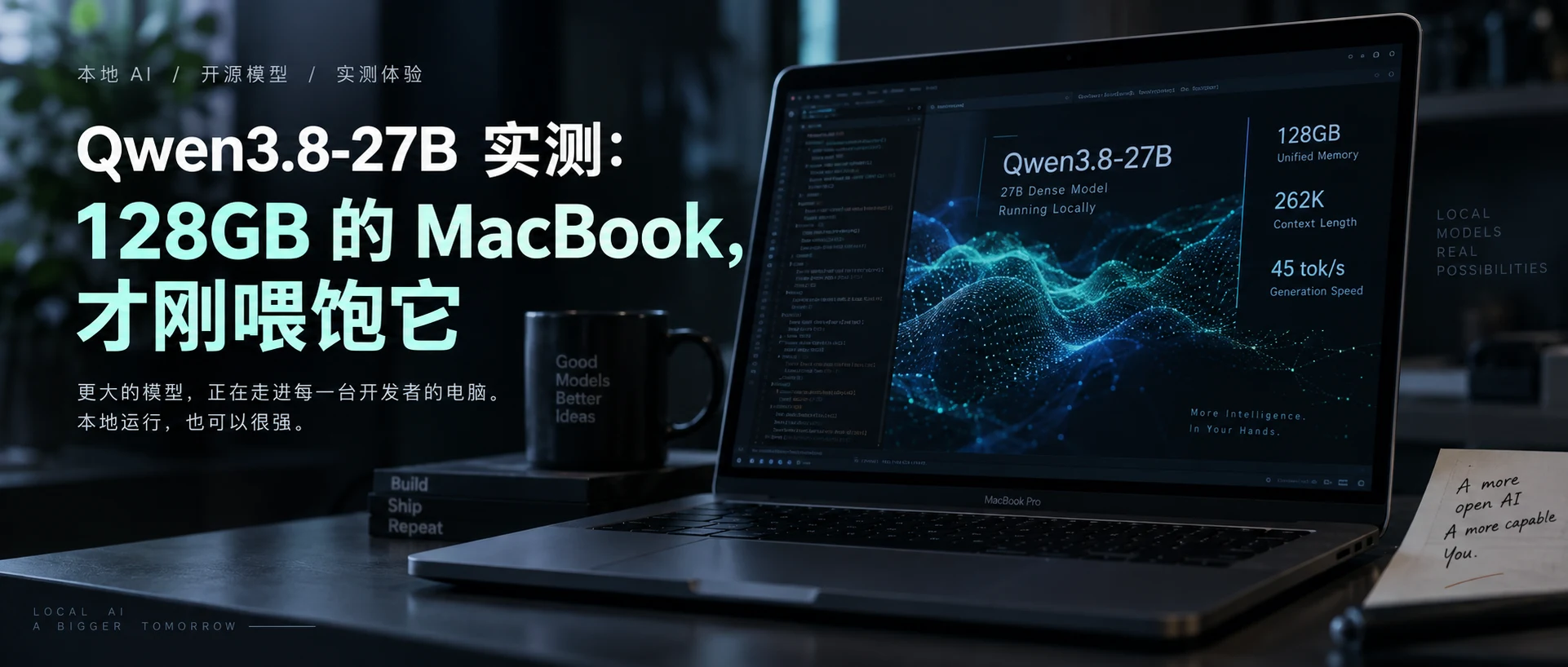
On the evening of August 14, Alibaba pushed Qwen3.8-27B up on Hugging Face. Three days later, my timeline was nothing but the same screenshot: on the leaderboard at launch it scored 52, tying GPT-5.6 Luna and landing within 1 point of the strongest models at the time.
And it's an open-source 27B model, licensed for whatever commercial use you like, installable on a single machine with enough memory.
I started tinkering with it four days after release, and for more than a month since, it has lived on this 128GB MacBook Pro M4 Max of mine. This piece is not about specs — it's about what it's actually like to keep an open-source "quasi-flagship" parked on a personal computer for a long stretch.
In Plain Terms, What Kind of Model It Is
Most of the models in fashion right now use the MoE architecture: the total parameter count is huge, but only a small slice of it activates for each token generated — a kind of "power-saving mode". Qwen3.8-27B is not one of those. It's a dense model — every single token generated runs the entire model through memory once. That's why it eats memory and bandwidth, and it's the root of every experience that follows.
It can also look at images and long videos; it isn't a text-only model. Training also gave it a built-in "speed hack" (MTP: guess several tokens at once and collect the ones you got right), and every community speed-up scheme since has been built on top of that design.
Its long context (260,000 tokens natively) also takes a shortcut: out of 64 layers, only 16 need to retain full attention memory, while the remaining 48 use an alternative structure that occupies almost no memory. So even with the long context maxed out, the cache takes just 16GB — that's where a 27B gets the nerve to advertise 262K.
Two more practical notes: the license is Apache 2.0, so commercial use is fine; and the official release only shipped the "full-flavor" large weights — every quantized version people run day to day is community-made. So under the very same name Qwen3.8-27B, switch the version or the software and the experience can differ enormously.
The Scores Are Real, but Don't Get Too Mystical About Them
The claim that it "surpasses Qwen3.7-Plus at coding" — I checked that against the official table, and it's largely true: on coding and Agent-type tasks (for example, the real terminal task test Terminal-Bench, 73.0 versus 64.0), this 27B that fits inside your computer genuinely beats Alibaba's own previous-generation cloud subscription.
But you have to draw the line: what it wins is coding and Agent work, not everything. On general-knowledge tests it still loses to the previous cloud version. And those numbers were run by the vendor itself, using its own toolchain and self-built evaluation harness — take them with a grain of salt.
One small epilogue: when I went back to check that 52 while writing this, I found the leaderboard methodology had already been updated within the past month, and today's ranking is no longer the 52 from launch day. Leaderboards describe "the week of release," not eternal truth.
What Reddit Has Been Talking About for the Past Month
This model dominated r/LocalLLaMA for over a month. The liveliest thread was a "what speed did you get" post with 385 comments, which turned into an unofficial speed comparison chart: an RTX 3090 running 30–45 tok/s; on the Mac side, anywhere from 11 on an M4 Pro 24GB up to 16 on an M1 Max. My M4 Max's 45 tok/s is fast by Mac standards, but people in the community pushed the same machine past 70 with far more hardcore setups — the easy route is not the limit route.
The praise concentrates on coding and Agent work: one person called it "the first model that genuinely seems willing to live on your machine and do real work for the long haul"; another user, after fixing their tool-calling configuration, saw Agent task success jump from 67% to 92.5%.
The biggest complaint is that it "thinks too much." One hands-on test reported: on a single coding request, it sat and thought for 142 seconds before it began answering; turn off thinking mode on the same question and it produced usable code in 28 seconds. But turn thinking off and people broadly report it gets noticeably dumber — stuck between a rock and a hard place.
My experience is almost identical to the community's, and I'll come back to both of these points below.
The Real Numbers on My Machine
For the runtime I used the lowest-friction option, Ollama. It's not the fastest route, but that's how I actually work, and I didn't want the numbers in this piece to come from an environment I'd never open in normal life. Here are the results of a re-run on the morning of September 17:
| Scenario | Prefill | Decode speed | Notes |
|---|---|---|---|
| Short context (~20 token) | — | 44.5 – 45.4 tok/s | Stable across three repeated runs |
| ~1K context | 249.7 tok/s | 42.0 tok/s | |
| ~7.4K context | 218.2 tok/s | 41.2 tok/s | |
| ~14.8K context | 212.4 tok/s | 39.0 tok/s | |
| ~27.8K context | 180.4 tok/s | 35.7 tok/s | Cold prefix |
| Follow-up after 27.8K | Prefix cache hit | 34.0 tok/s | TTFT ≈ 3.2s |
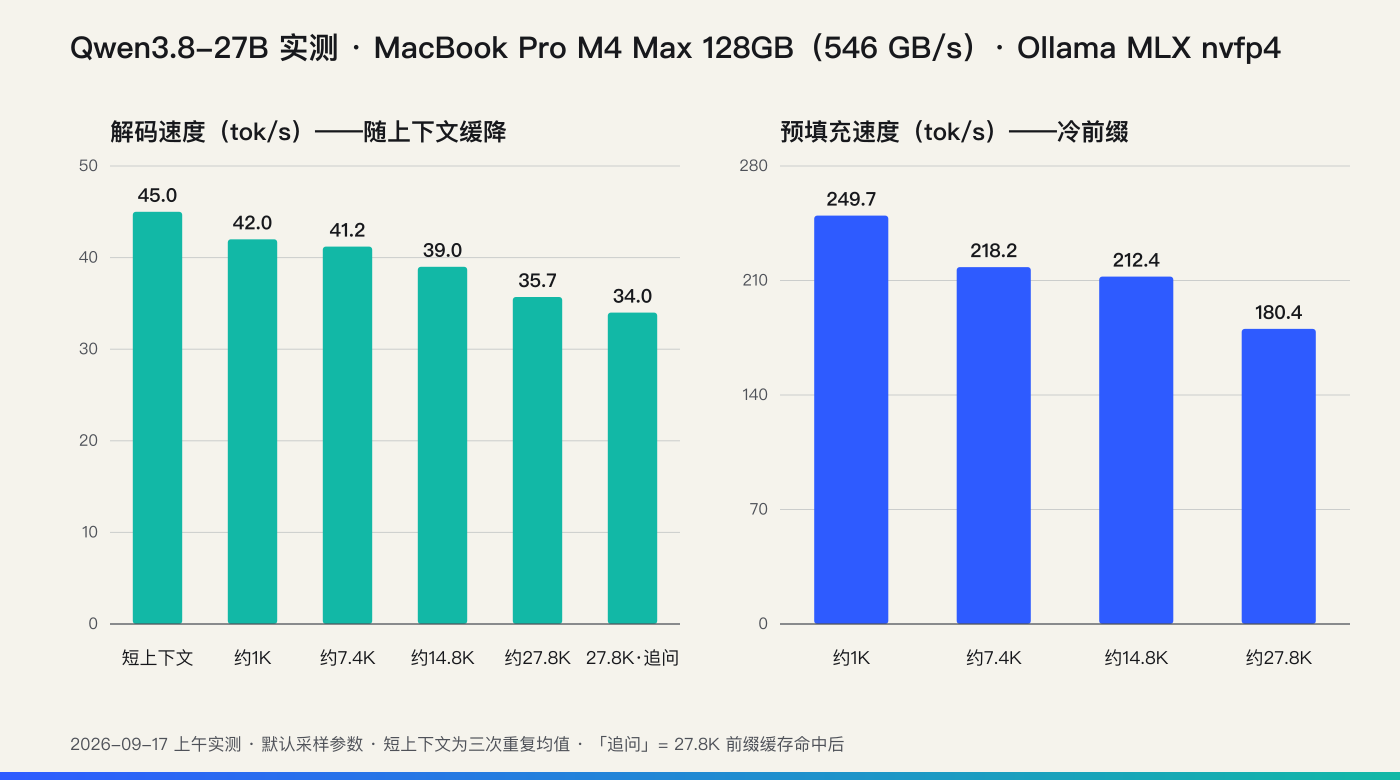
Three findings are more interesting than the numbers themselves.
First, that 45 tok/s is a score earned with the "speed hack" switched on. Judged by memory bandwidth, the pure-decode ceiling is only in the thirties; the logs show MTP working continuously, with a hit rate of seventy to eighty percent. That's also why one community member measured just 24.6 with it turned off — the 45 I see every day already includes that share of the gain.
Second, the real bottleneck on a laptop isn't generating tokens, it's "eating documents." Measured prefill runs 180–250 tok/s, so feeding a cold 60,000-token document takes a bit over four minutes. The saving grace is the prefix cache: once you've fed the material, follow-up questions only pay for the increment and it starts answering in seconds. Whether the long-context experience feels good is half about whether you can work with that temperament.
Third, memory use is much bigger than the "18GB" label suggests. The software reserves cache space for the maximum context at startup, sits at just over 30GB day to day, and climbs further as context grows (52GB later on). On 128GB it's imperceptible; on 48GB you'd start counting.
There's one more small puzzle I never solved: even for a tiny one-sentence request, the first token takes 2.5–3.3 seconds, as if there's a fixed overhead per request. It seems related to the vision module; I didn't dig deeper. The implication is clear — it can't serve as the brain of a voice assistant, but for getting work done, this latency is irrelevant.
I Pushed 200,000 Tokens Into It
The official spec claims support for 260,000 tokens of context, and I kept wanting to push it to the limit.
Going back through the logs from the evening of September 9, I found that experiment: a 205,000-token document that took eight segments to feed in, the prefix cache climbing section by section, memory rising from 40GB all the way to 52.36GB.
The conclusion has two layers. It fits: a whole book's worth of material, no crash, with the browser and IDE running as usual alongside it — that's exactly what 128GB means. But fitting in isn't the same as working well: its reliability at finding things inside that much content still falls short of the point where I'd trust it with them. From now on, whenever I see a "native 262K" claim, I'll automatically split it into two questions: can it fit, and is it still good once it's full.
Speed counts as well: cold-processing 200,000 tokens takes 17 minutes, and without the prefix cache, that length can't be used for ordinary interaction on a personal computer.
Two Days of Real Work
Over benchmark scores, I'd rather see whether a model can finish a real project.
From September 8 to 9, I had it build a complete project: PyTurtle Studio — a programming IDE that runs real Python directly in the browser. Genuine CPython executes inside the browser, the turtle graphics draw onto the page canvas, and there's a console that handles input and output.
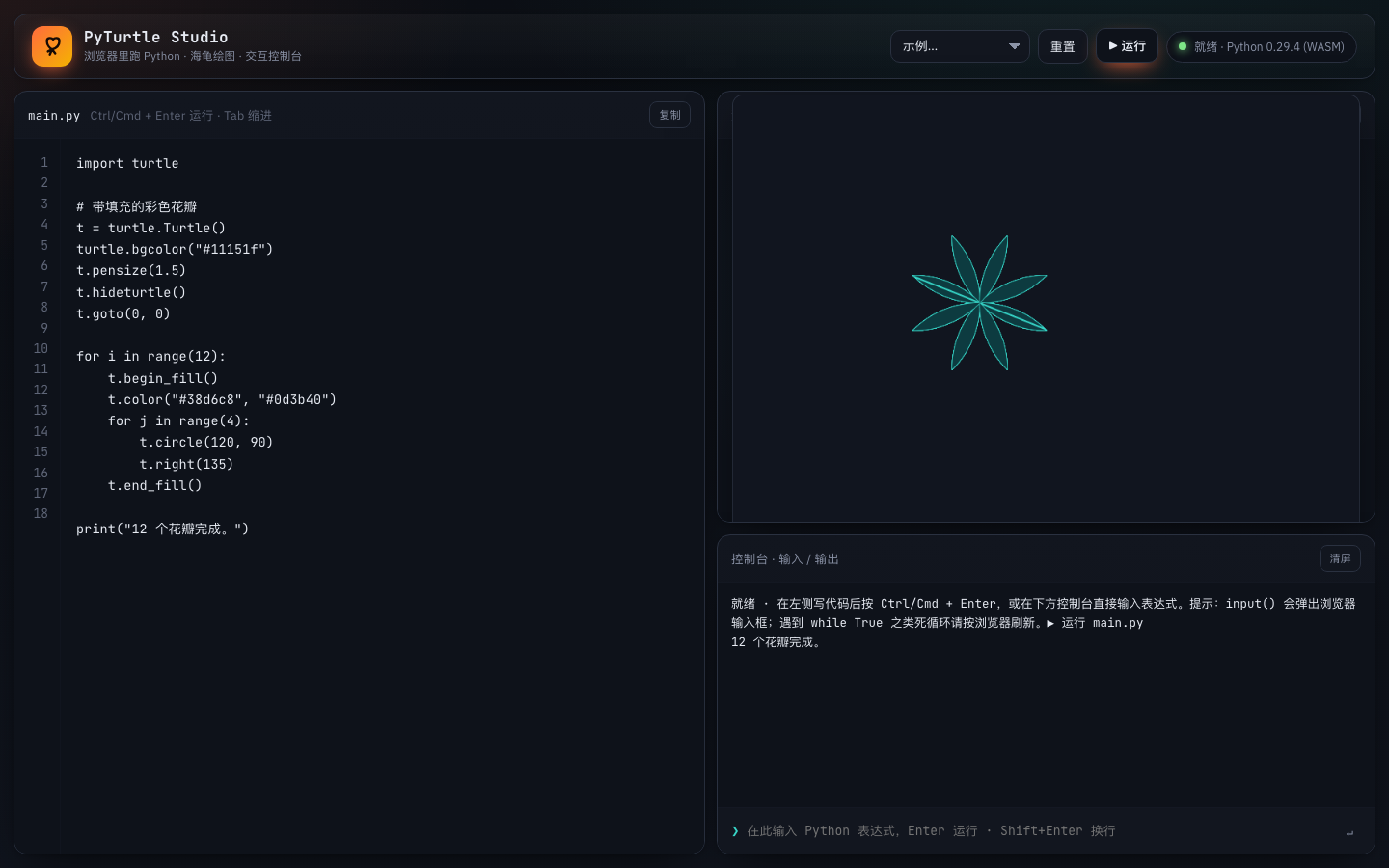
Two days of logs: 154 requests, about 5 hours of pure model compute in total, the longest single run 12 minutes. My working method is to state the requirements clearly, let it do the work itself, come back later to inspect, and have it fix things when it's wrong.
It delivered 8 files and 2,300 lines of code, working out of the box.
More surprising than the line count: it equipped the project with its own complete verification setup. The drawing module has unit tests, there's a self-test script that simulates the full flow, there's a script that inspects the rendered output pixel by pixel in a real browser, and it even wrote a small tool for "bundling it back into a single file." Reddit said it proactively writes tests — this time I verified it first-hand.
Slow is real too — that 12 minutes was deep thinking. Sitting in front of the screen waiting for it is genuinely uncomfortable, but used as a worker you hand a requirement to and let grind, the pace actually feels comfortable. Even the "known issues" section in the project docs was honestly written by the model itself. That point is more persuasive than a few extra benchmark points.
What 128GB Actually Buys You
If the only question is "can it run at all," 32GB of memory has a chance — it's not that dramatic.
But "running" and "living in" are two different things. The model occupies 30GB, climbing to 52GB during experiments, while my browser, IDE, and terminal keep running as usual, and I can still hang a small model on top. The computer is still my computer — it hasn't become a dedicated machine I'm afraid to touch because it's running this.
As for speed — 128GB doesn't buy speed (that's determined by memory bandwidth), it buys headroom: the kind where you make no trade-offs at all. At this tier, only now has this model truly "moved in" to the computer.
Is Running a 27B Dense Model Still Worth It
The fiercest fight on the forums is exactly this: with the same amount of memory, why not run a faster MoE?
After a month of use, my answer isn't either/or, it's division of labor: hand the jobs that need a fast first token (voice, Q&A, completion) to small models and MoE; hand the quality-critical heavy lifting (code review, long-document analysis, Agent work) to this one. A month in, I already throw heavy tasks at it by reflex.
There's also a very pragmatic ledger to run: a model living on your own machine costs one cent more after a hundred calls. It isn't necessarily smarter than the cloud, but it lets me use it without holding back — and you only learn how much that matters once you've actually used it that way.
Closing Thoughts
By the end of this piece, what stuck with me most wasn't the 128GB, and it wasn't the 45 tok/s either.
It was the shift itself: progress in local models is no longer just "models keep getting bigger" — training, post-training, quantization, inference software, acceleration techniques are all moving forward at the same time.
Cloud models getting stronger, we can't feel the difference behind them; local is different. My computer won't magically have twice the memory next year, but this very same computer might run a noticeably smarter model next year. The hardware is already paid for; what to look forward to now is how much more capability can be packed inside it.
References
- Qwen3.8 official repository and model card: https://github.com/QwenLM/Qwen3.8 ; https://huggingface.co/Qwen/Qwen3.8-27B
- Artificial Analysis: Qwen3.8-27B: https://artificialanalysis.ai/models/qwen3-8-27b
- Simon Willison: Qwen3.8-27B scores 52 (2026-08-17): https://simonwillison.net/2026/Aug/17/qwen-38-27b-scores-52/
- ifeng Tech: Alibaba open-sources Qwen3.8-27B (2026-08-15): https://tech.ifeng.com/c/8vbMNx17cfF
- QbitAI: Qwen3.8-27B open-sourced: https://www.qbitai.com/2026/08/473379.html
- smeltcore: Qwen3.8-27B on Apple M4 Max: https://smeltcore.com/recipes/qwen3-8-27b-on-apple-m4-max-4-bit-mlx-vision-language-at-the-full-262k-context/
- Apple MacBook Pro technical specs: https://support.apple.com/en-us/121553
- Ollama qwen3.8: https://ollama.com/library/qwen3.8
- mlx-community: https://huggingface.co/mlx-community/Qwen3.8-27B-4bit ; ggml-org: https://huggingface.co/ggml-org/Qwen3.8-27B-GGUF
- DFlash2: https://huggingface.co/incoai/Qwen3.8-27B-DFlash2 ; https://inco.ai/blog/dflash2/
- MTPLX community rework: https://huggingface.co/Youssofal/Qwen3.8-27B-MTPLX-Optimized-Speed
- Reddit hands-on threads: tok/s flex thread https://www.reddit.com/r/LocalLLaMA/comments/1vqjeub/ ; quantization review https://www.reddit.com/r/LocalLLaMA/comments/1vz3ieu/ ; M4 Pro 24GB hands-on test https://www.reddit.com/r/ollama/comments/1vrqi3d/ ; M1 Max comparison https://www.reddit.com/r/ollama/comments/1wa0feg/ ; Gemma4 vs Qwen discussion https://www.reddit.com/r/LocalLLaMA/comments/1vyzopv/
- Hands-on test of oMLX + ANE + MTP on M4 Max 128GB: https://github.com/Weschera/Qwen3.8-27B-oMLX-MTP-Mac
- Hacker News launch discussion: https://news.ycombinator.com/item?id=49299605
- Raw logs and scripts from this hands-on test: Ollama server log (2026-09-06 – 09-17), custom-built benchmark scripts
Writing note: The views and hands-on measurements in this piece are the author's own; AI assisted with source research, data organization, and copyediting. Official benchmarks are cited as officially reported; community data comes from public discussions and some results are self-reported by their posters — none of them were independently reproduced here.
If this piece was useful to you, follow the WeChat official account "AITi智能" — it updates weekly. Also published on the website edition: getaiti.com
Subscribe · 订阅
Scan to follow on WeChat
Essays update weekly and go live on the website and on the WeChat account “AITi智能” at the same time. Scan the code to get them the moment they’re out.
- 01 Search “AITi智能” in WeChat
- 02 Follow it and add it to your favourites
- 03 Weekly updates — see you there

Scan to follow · one essay a week