Archive / NO.002 · local AI · digital companion · hands-on test
I Raised a Fully Local AI Companion on My Mac
One MacBook, one fully local ASR + LLM + TTS + avatar + memory stack: how I took an AI digital companion from demo to something you can actually talk to, and the two product paths it made me rethink.
CONTENTS 10
- 01 At first, I just wanted to move voice on-device
- 02 Let's try it on the Mac first
- 03 Then an AI girlfriend video sent the whole thing off course
- 04 Photorealistic, or anime-style?
- 05 But what actually made it feel like a "companion" wasn't the digital human
- 06 Is 4B Actually Enough?
- 07 It Already Knows Today's Date, But That's Not Enough
- 08 Halfway Through, I Started Asking: Could This Be Sold?
- 09 What If the Same Thing Ran on an Edge Device?
- 10 References and Resources
"What's worth watching?" I asked it.
It had barely started recommending something before I cut in: "Forget it, no movies today — tell me what's been in the news."
It stopped, waited for me to finish, then carried on with the new topic without missing a beat — not a stutter anywhere, as if it were really listening.
This is not a cloud AI. Speech recognition, the LLM, the voice, the avatar, the memory — all of it runs on the MacBook sitting next to me. The data never leaves the house; the model never touches the network.
For the last week or two I've been obsessing over one thing: building an AI digital companion that runs entirely on-device.
"Entirely local" means speech recognition, the local LLM, speech synthesis, the avatar, and memory all happen on your own machine, with no data leaving and no cloud API dependency.
There's a roughly working version now. You can just talk to it — it listens, thinks, answers, has its own voice and appearance; you can interrupt it mid-sentence; and it still remembers things you've discussed next time around.
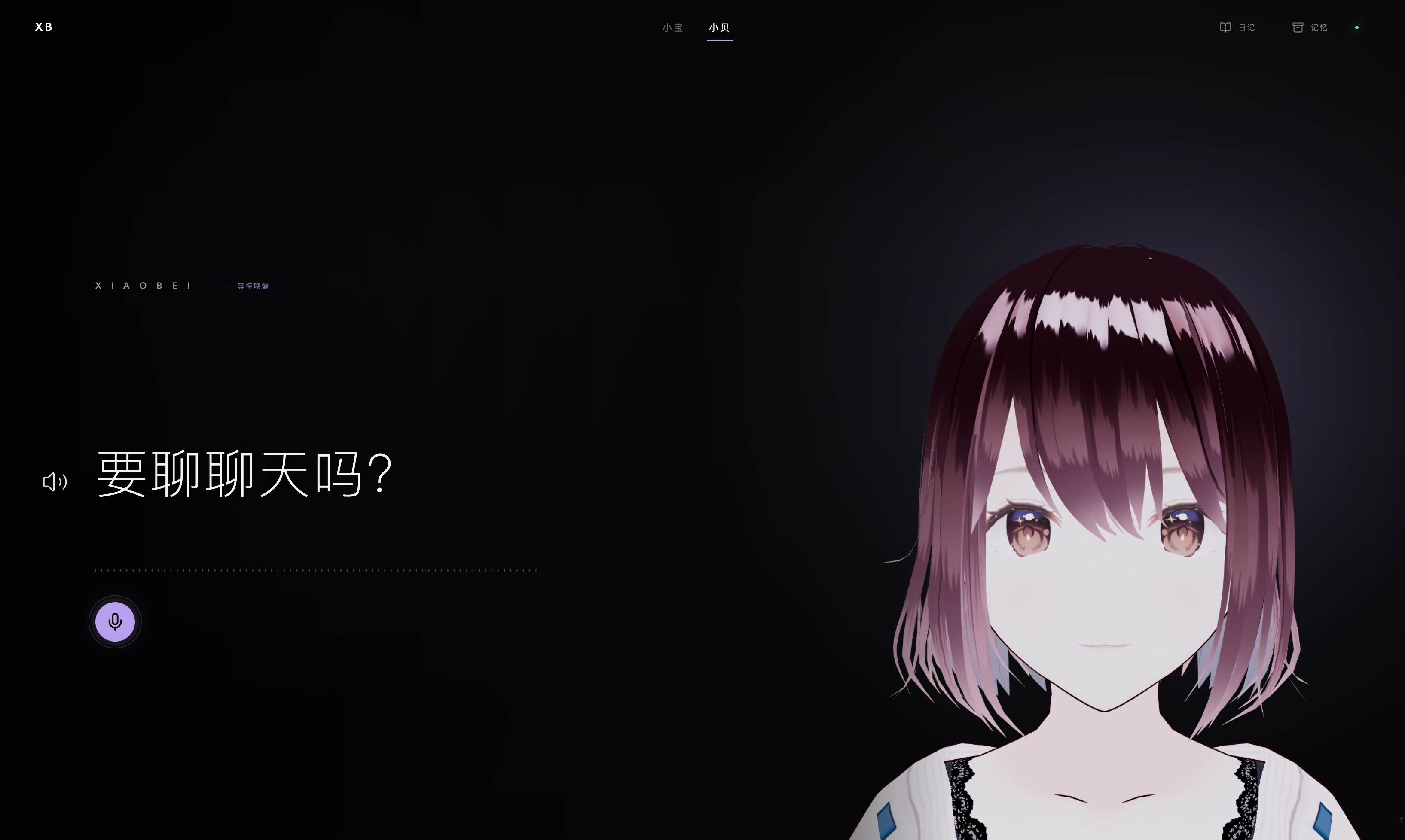
Of course, this is still a long way from a real "companion." But after building the whole thing out, I found parts of it far more interesting than I expected going in.
And, come to think of it, "AI companion" wasn't remotely what I set out to build in the first place.
At first, I just wanted to move voice on-device
It started with a product I'm building.
That product has a voice assistant called Xiaobao Voice. Our first approach was the conventional one: voice interaction through the cloud. It worked well enough and it built fast, but we ran into two very practical problems almost immediately — privacy, and cost.
Especially once voice became a high-frequency feature: ASR, TTS, plus LLM calls, and cloud API costs add up fast.
So we've been trying to push more and more onto the local side. We'd already moved the server side of the voice service onto edge devices, but the moment we actually tried dragging ASR and TTS on-device too, the real problem showed up: the models that used to run locally — "it runs" and "it works well" are two very different things.
I tried FunASR, Whisper, and a handful of TTS options in turn. Some had decent recognition, some had decent speed, but dropped into real-time voice conversation they always felt a notch short.
Voice is strange that way. In a text chat, a one-second delay is something you barely notice. But when two people talk face to face, you finish a sentence and the other person freezes for two or three seconds before answering — the feeling is instantly wrong.
So the problem just sat there, unsolved.
Then I saw Qwen3-ASR and Qwen3-TTS. Both ship tiny 0.6B versions, and suddenly this felt worth another shot.
Let's try it on the Mac first
The company product runs on an Intel Core Ultra 5 225H platform, but I didn't start by wrestling with the product hardware.
Because my own MacBook M4 Max has 128GB of memory, and Apple has MLX, an inference framework built for Apple Silicon. So the idea was simple: stop overthinking it, get it running on the Mac first and see what happens.
I put together a demo fast. ASR on a local model, the LLM local too, TTS done locally as well.
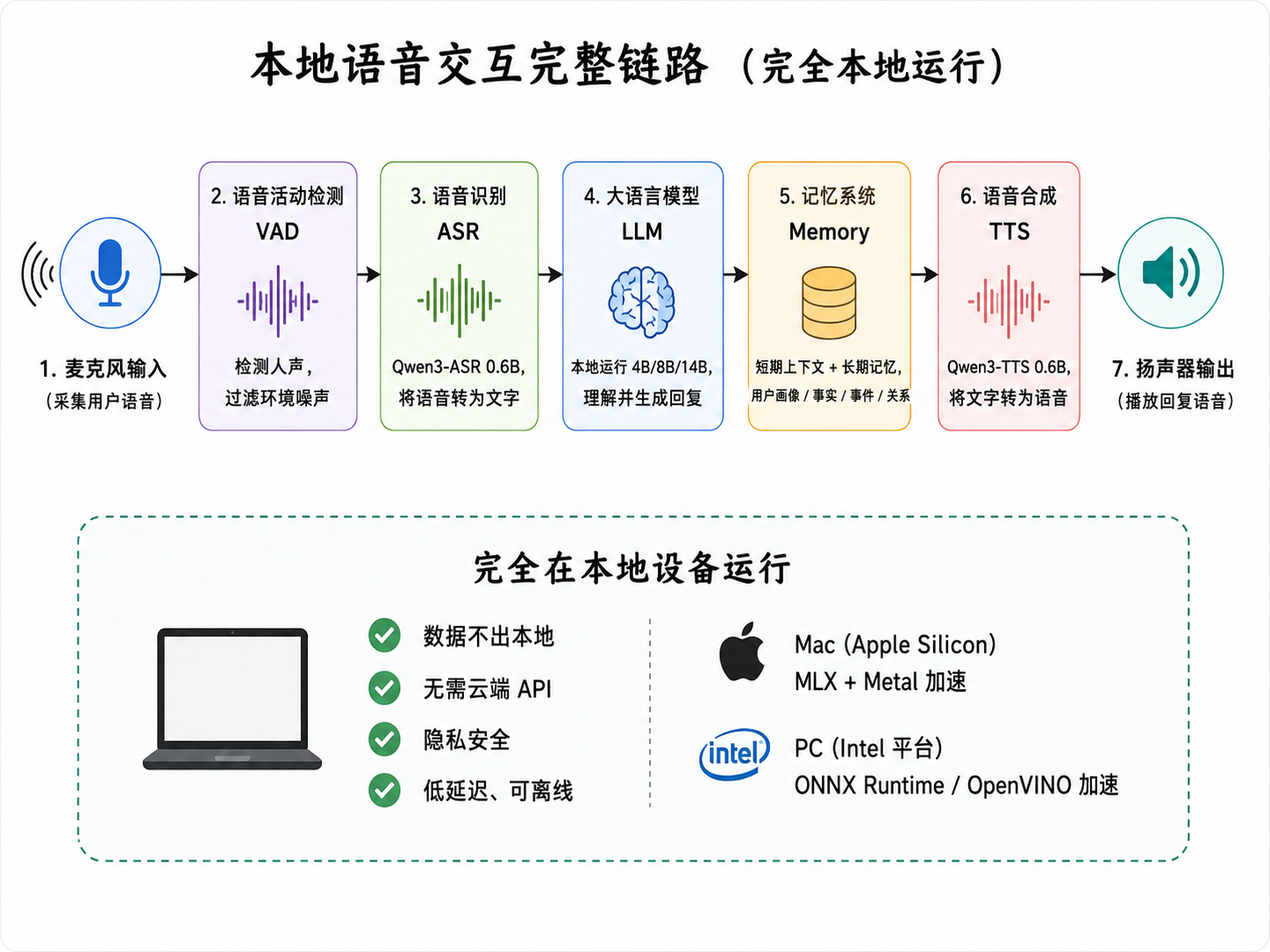
Once it was actually running, the result was better than I expected — especially on latency. For the first time, fully local real-time voice conversation stopped being a "theoretically possible" thing and started being an "actually usable" one.
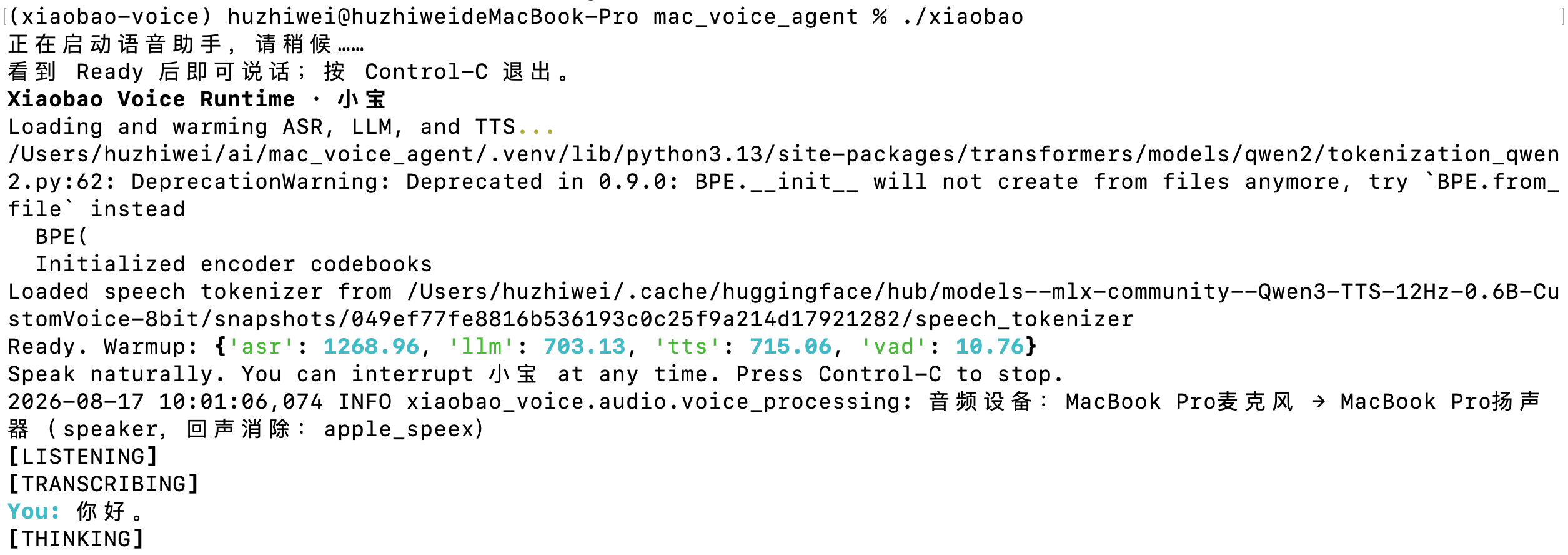
There was another option here, actually. At the time I considered going straight to Voice-to-Voice — the end-to-end speech model everyone loves talking about these days.
On paper that's the prettier path: audio goes in, audio comes out, and the traditional ASR → LLM → TTS in the middle disappears.
But in the end I didn't do that.
On the one hand, there still aren't many mature on-device end-to-end speech models to pick from. On the other, I care more about control over the whole pipeline. If the ASR is wrong, I know it's the ASR. If the LLM answers badly, I can tune the prompt or swap the model. If the voice sounds bad, I can tune the TTS on its own.
While building the demo, that seemingly "dumber" architecture actually made me feel more in control. So I stayed with ASR → LLM → TTS.
Not sexy technically, but it works.
The longer I build products, the more convinced I am that the most advanced approach and the best approach for a product are rarely the same thing.
Then an AI girlfriend video sent the whole thing off course
Once voice worked, all I wanted was to validate the local voice stack.
Then one day I was scrolling Xiaohongshu and saw that someone had built an AI girlfriend. I don't remember what the project was called, but what stuck with me is that they used a female character from Naruto — you could talk to her, interact with her, and get all kinds of responses out of her.
My first reaction wasn't "an AI girlfriend, that's interesting." It was: what if this thing ran entirely on-device — would that be interesting?
Because companion products have a very specific problem: what you say to one is likely far more private than what you'd say to an ordinary AI. So what if all the voice, all the chat logs, all the memory — even the relationship that forms between you and this character — lived on your own machine?
That idea moved the whole project in one step from "local voice assistant" toward a different direction entirely.
Later I started thinking about AI characters that already exist in games. They made me realize, more and more, that a voice alone isn't enough. If you're really going to call it a "companion," it should have a face you can actually see.
So I started adding a digital human.
Photorealistic, or anime-style?
This part had its own pile of traps.
What I actually wanted to build first was a photorealistic digital human. The most direct reference was something like Call Annie — a real-looking person talking with you in real time. I also looked at AVTR-style photorealistic digital-human pipelines. The picture really is appealing: an AI that looks like a real person, keeping you company.
But I dropped that idea fast. The problem isn't technical implementation, it's expectations: the moment it looks like a real person, what people demand of it changes instantly. Lip sync a little off and it feels unnatural; expressions a beat too slow, unnatural; eyes not tracking right, unnatural. The more humanlike it is, the more every single flaw gets magnified into "fake." That's not one approach failing over another — it's baggage baked into the photorealistic route from birth.
So I turned to virtual avatars, specifically two routes: Live2D and VRM.
Live2D animates a 2D illustration and by construction has no "does it look like a real person" problem; VRM is the de facto standard format for 3D virtual avatars, with a far more complete ecosystem. In practice, though, the Live2D stack was nowhere near as smooth on the Mac as I'd hoped, so in the end I went with an anime-style VRM model.
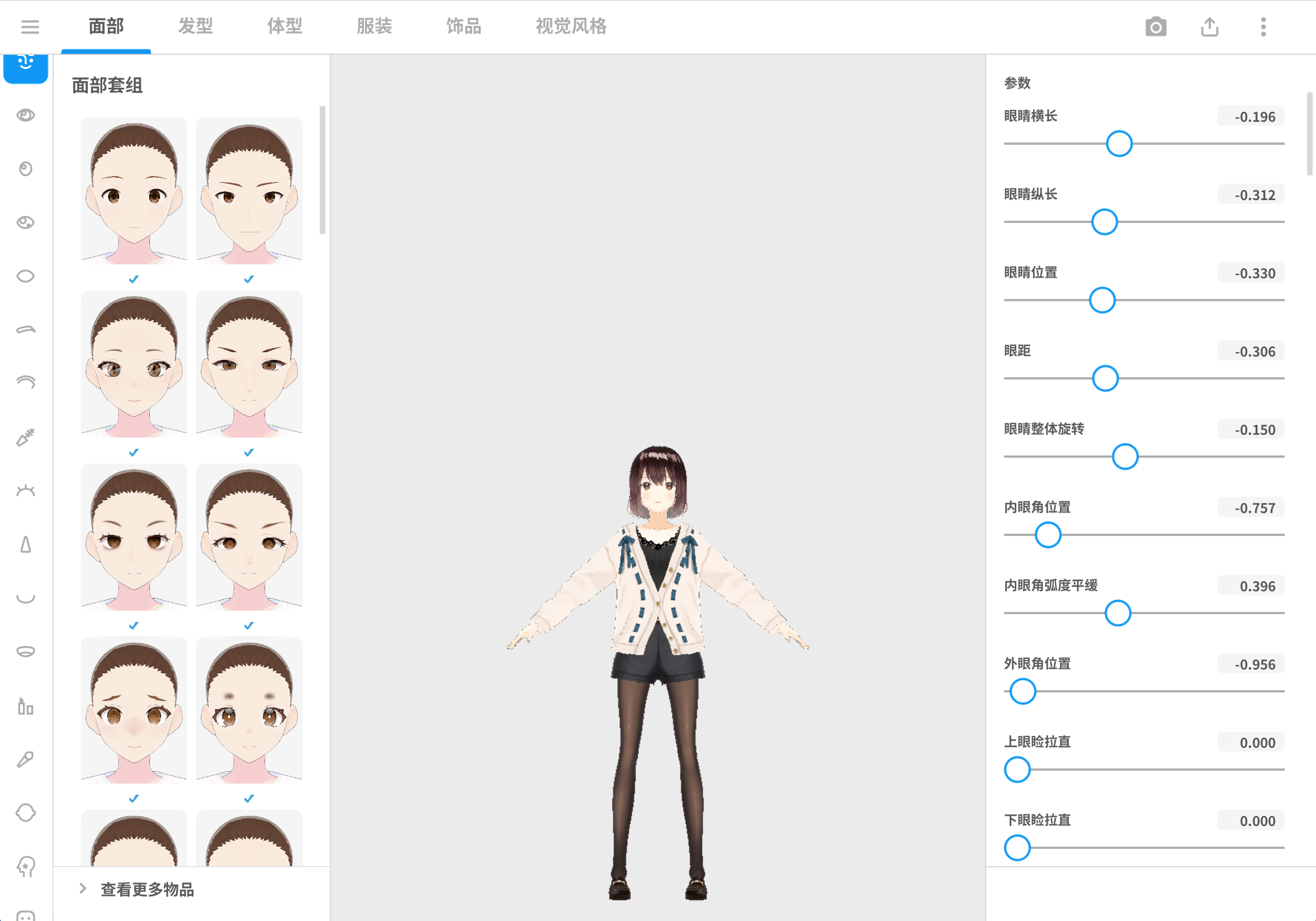
I started tuning its mouth shapes — AEIOU, one viseme per sound — and gave it a set of states. While I talk, it's listening. While the model generates, it's thinking. While it answers, the mouth follows the audio. And when nothing is happening it can't just stand there like a frozen process, so it needs idle motions and expressions too.
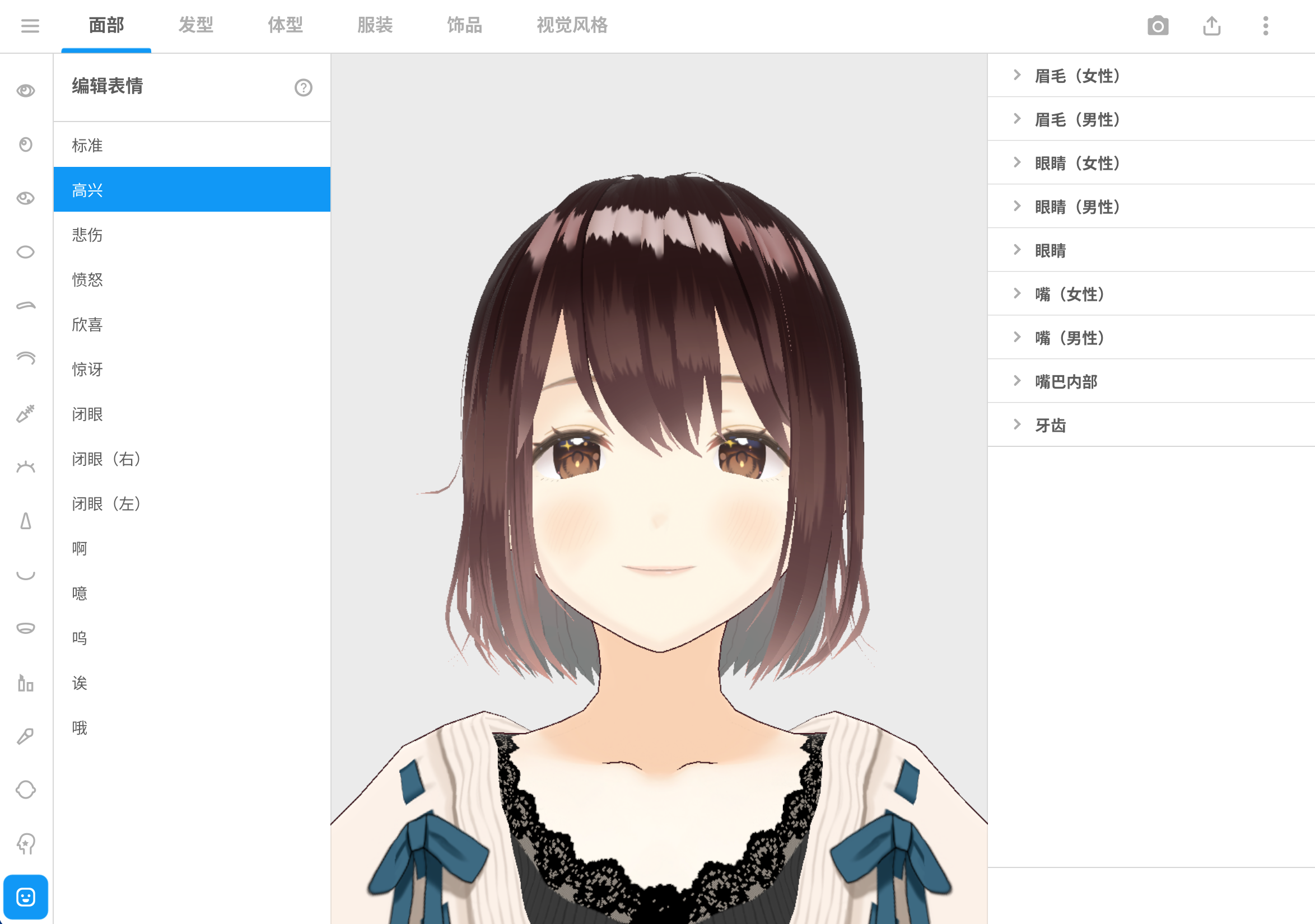
None of these is cutting-edge technology on its own. What's interesting is that once you bolt them all together, it suddenly starts to feel a little "alive."
Later I added barge-in. While it's talking, I can just cut in.
This looks like a tiny thing, but it wrecks the experience if you get it wrong. Real conversation was never "you talk for 30 seconds, then I talk for 30 seconds." People interrupt, pause, jump in. If the moment the AI opens its mouth you can only wait for it to finish speaking, you're still "using a piece of software" — you'll never really get the feeling of chatting.
But what actually made it feel like a "companion" wasn't the digital human
It was memory.
I honestly hadn't thought about this hard until I started reading user feedback on AI character products.
Everyone starts out thinking the character is beautiful and the voice is nice, then after a few conversations realizes it doesn't remember you.
Things you told it yesterday, you have to say again today. It doesn't know your habits. It doesn't know what happened between you. So this so-called "companionship" is basically a first meeting every time you open it.
Which is a bit strange.
So I ended up spending a lot of time on memory. I started out writing it myself, and quickly found out the hole goes deeper than I'd imagined.
Memory isn't a matter of dumping chat logs into a database and calling it done. What should be remembered, and what shouldn't? When should it be pulled back out? What happens when it's remembered wrong? What happens when the same thing has changed since? Which items are facts about the user, which are events that happened, and which are the relationship that has formed between the two of you?
In the end I stopped trying to reinvent the wheel entirely. I used Mem0 and put my own layer on top.
Right now there are roughly a few categories: short-term context, long-term memory, user profile, factual memory, episodic memory, and relationship memory.
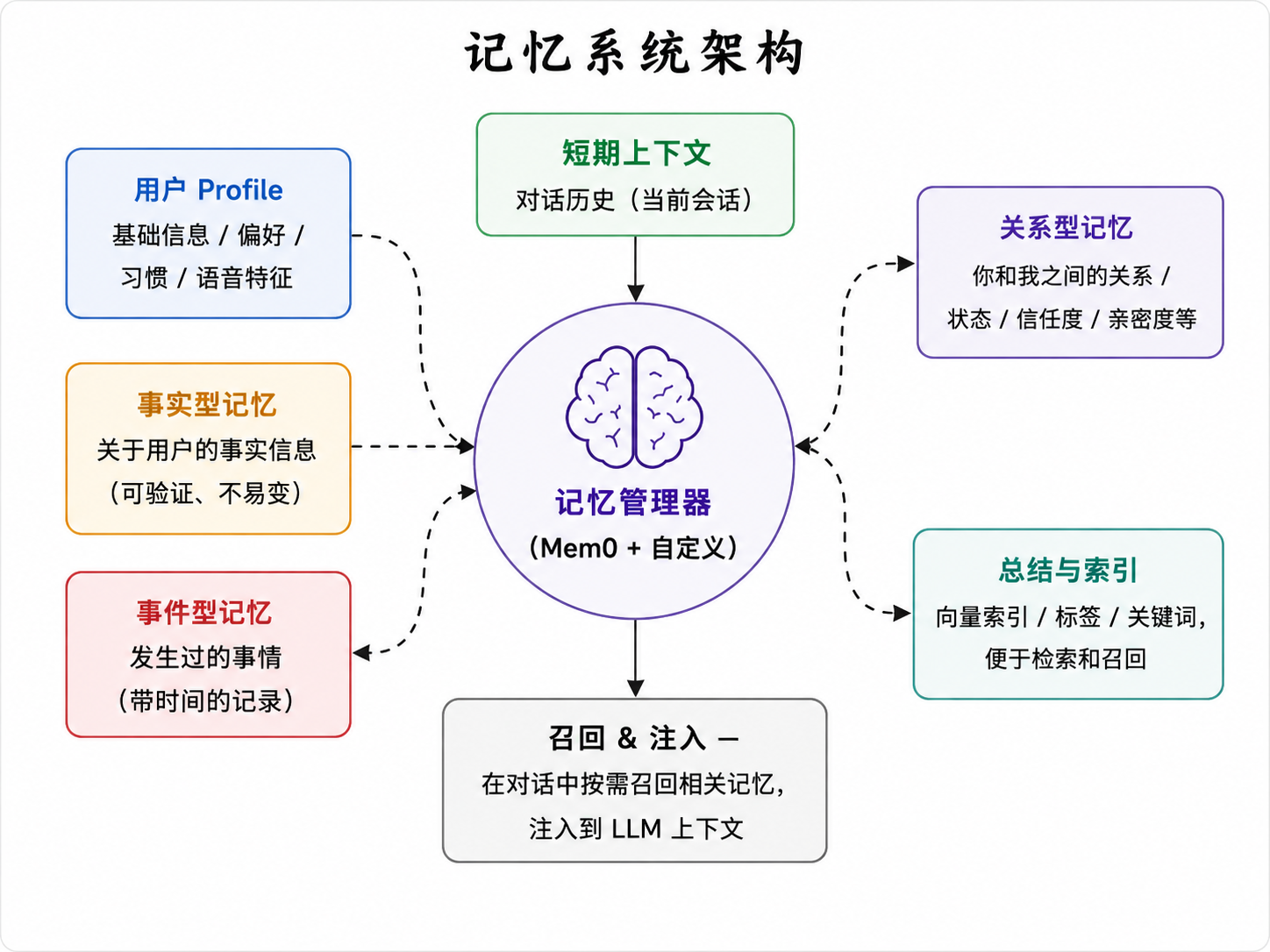
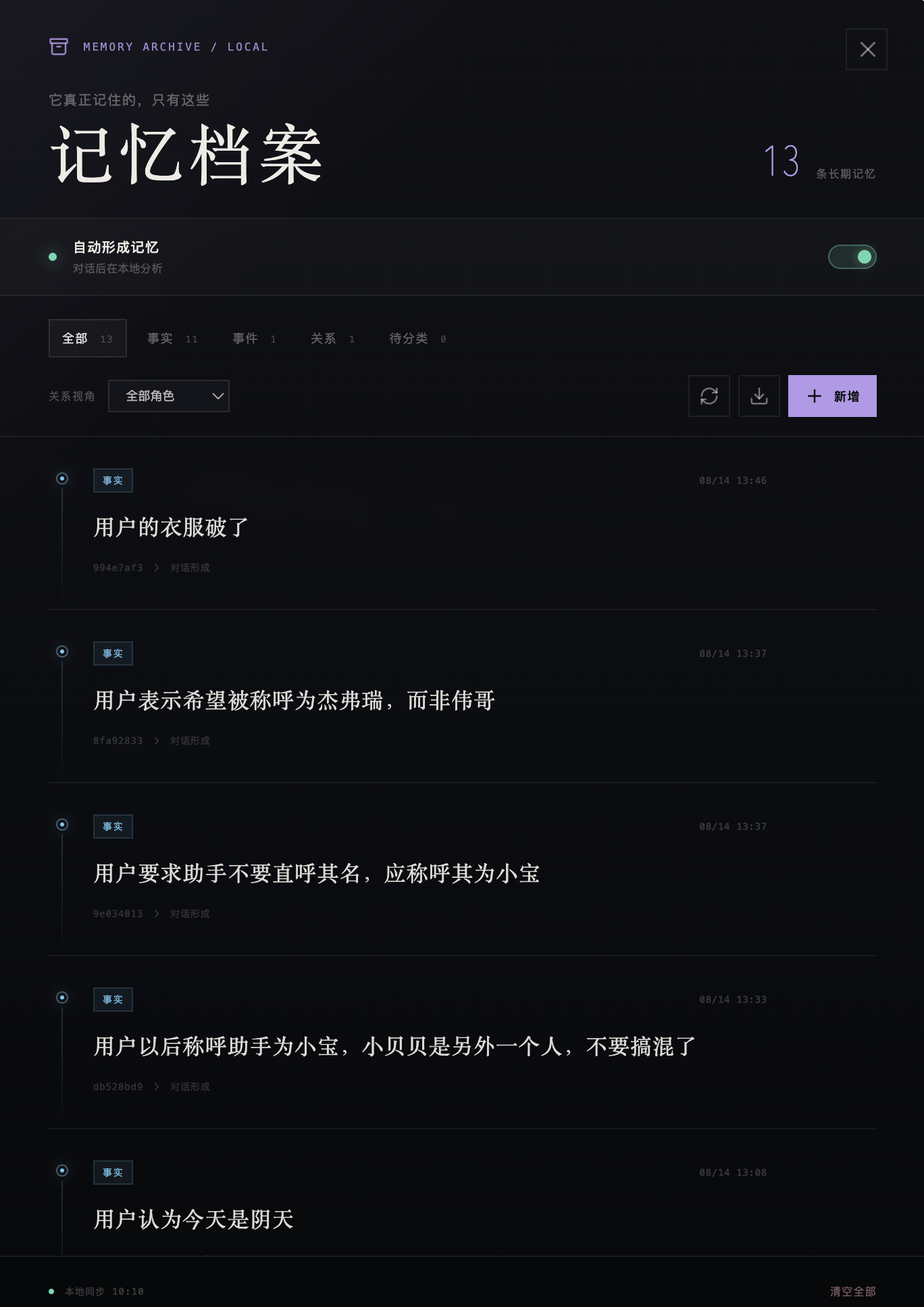
It's still very primitive, of course. But once memory went in, my understanding of what an "AI companion" is shifted a little: maybe the most important thing about companion AI isn't how smart it is, but whether it can form a continuous relationship with you.
The model, the voice, the character can all be swapped later, but the day it forgets you, everything you built up before it seems to be gone in an instant.
Is 4B Actually Enough?
Right now I'm running a local 4B model. To figure out how "smarter" and "faster" actually trade off against each other, I hands-on tested the 4B, 8B, and 14B sizes on my own MacBook (M4 Max / 128GB / MLX) under completely identical conditions: the same prompt, the same 256 tokens generated, three runs per model with the median taken.
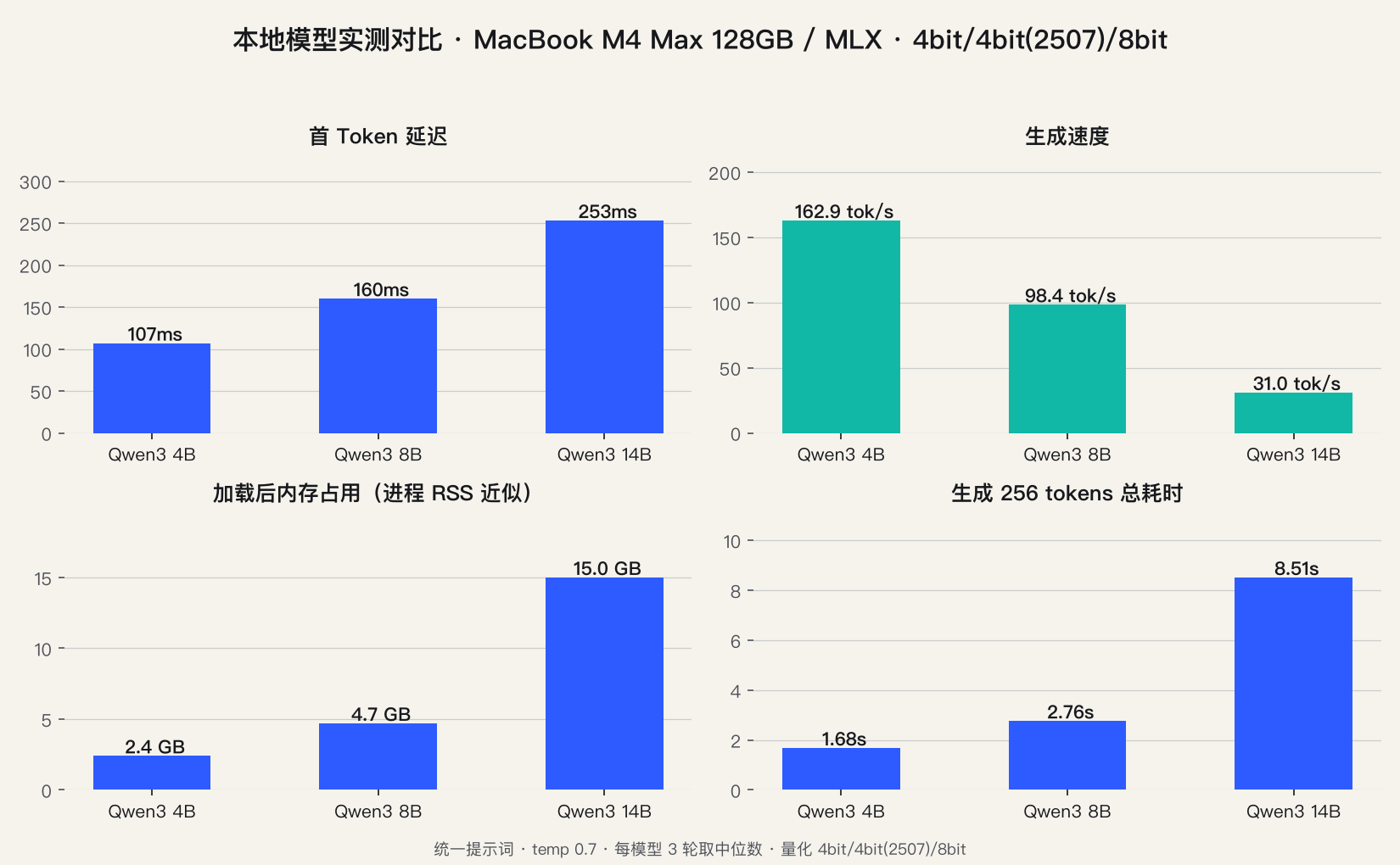
The results were more interesting than I expected.
Speed first. The 4B takes just over 100 milliseconds from the end of your sentence to the start of its reply, generating at 160 tokens/s. The 8B has a 160 ms time to first token, and throughput drops to 98 tokens/s. The 14B's time to first token is 253 ms, and throughput falls to just 31 tokens/s. Generating replies of the same length, the three models took 1.7 seconds, 2.8 seconds, and 8.5 seconds respectively.
At this point you might ask: if the 14B takes 8.5 seconds to finish generating, doesn't the user just sit there watching the avatar freeze for eight and a half seconds?
Not quite. This pipeline is streaming: the moment the model produces its first token, TTS starts synthesizing, so the voice is practically thinking and talking at the same time. What actually determines "when it opens its mouth" is the time to first token, not total generation time — and the 14B's TTFT is 253 ms, which, with streaming TTS startup, is not slow at all.
So where is the 14B's problem? In the thinking. The 8B and 14B both "think" internally for a while before answering — and during those few seconds of generating the reasoning, no actual spoken text is flowing out yet, so TTS has nothing to say and the digital human can only stand there waiting. What actually feels like a pause isn't that it talks slowly; it's that it thinks for a long time before it opens its mouth.
That's why 8B is the sweet spot, and the reason is right there: shorter thinking, speech that's fast enough, and an overall rhythm closest to real conversation.
Now capability. The 4B's ceiling is obvious: ask it something slightly complicated and it will hand you a tidy framework, but it can't survive follow-up questions. The 8B and 14B both "think" for a bit first, and their answers are noticeably more complete. The memory bill is right there too: the 4B needs only 2.4GB, the 8B is 4.7GB, and the 14B jumps straight to 15GB.
So my preliminary conclusion: for a digital companion, 8B is probably the sweet spot — speed still inside the range a conversation can absorb, capability a clear step up from 4B; the 14B is better suited to edge devices with more compute than to a personal computer.
(These numbers come from my machine and my quantization settings, so they only represent me. I've also put the test methodology on the site — you can run it on your own machine too.)
It Already Knows Today's Date, But That's Not Enough
A local model has no idea what time it is or what today's date is. So a while back I gave it the two simplest tools there are: date and time.
Now if you ask it "what's today's date" or "what time is it," it tells you straight away — not because it memorized it, but because it actually calls a tool to read the system clock.
That doesn't sound like much, but for a local model it's a big deal: it has a sense of "now" for the first time.
There's a lot more to add: weather, calendar, schedule reminders, this Mac's hardware state... But here I've set one rule for myself: none of that ever gets hardcoded into the system. Everything becomes a tool plugin that the AI calls on demand.
Because today this thing runs on a Mac; tomorrow it might run on Windows, or on an edge AI device. Platform-specific capabilities have to be pluggable — the core stays put, the plugins change with the platform.
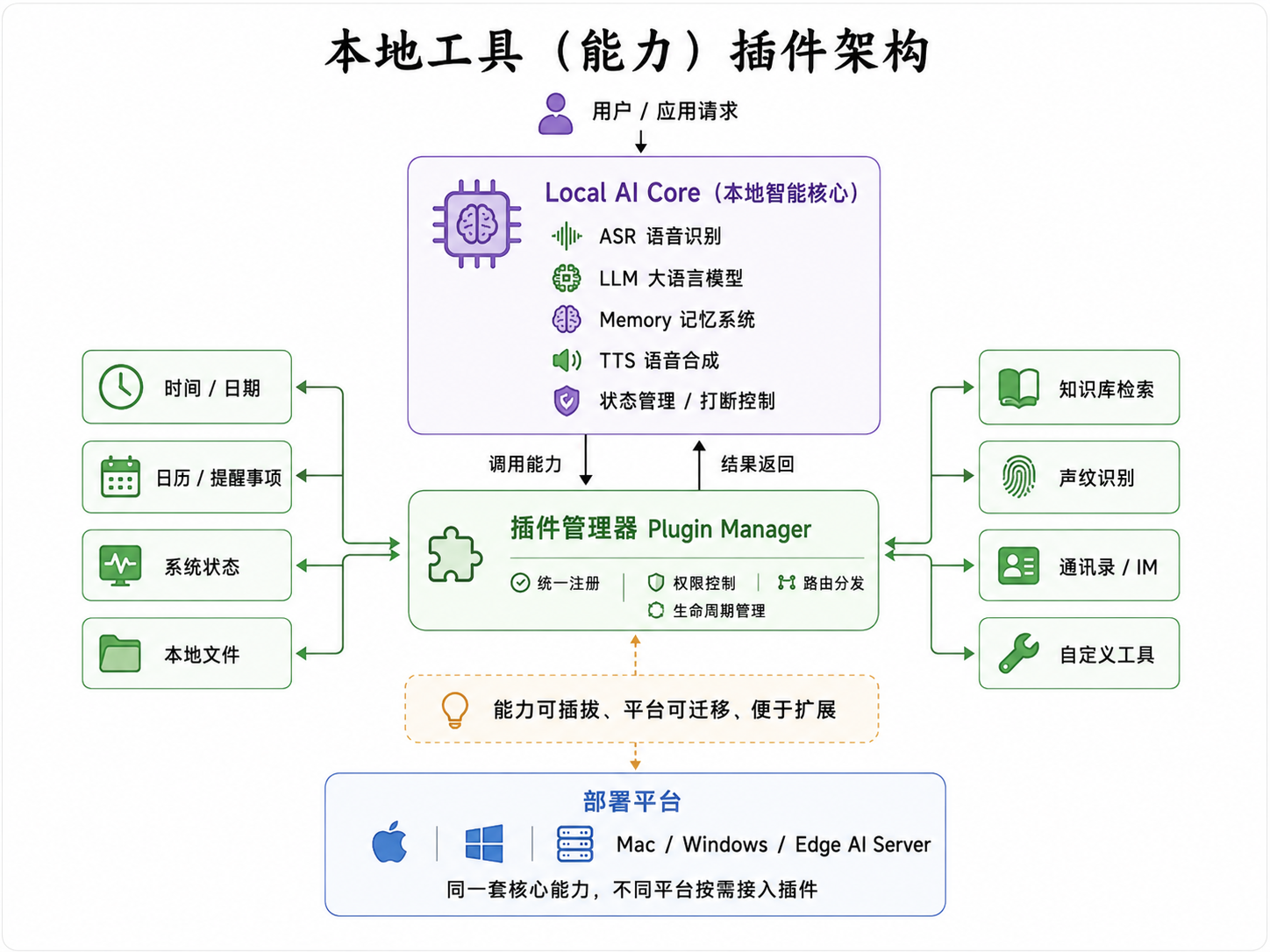
There's another problem I ran into recently that's also kind of interesting. When I'm chatting with it, if someone on the nearby TV starts talking, it thinks they're talking to it — and the TV can even barge in.
So next I'm adding voiceprint recognition, so that at least it can tell whether it's me talking or someone on the TV.
By the time I got here, I slowly realized that making a digital companion good is no longer about "running a large language model locally." Voice, memory, character, state, barge-in, voiceprints, tool calls... What the user actually experiences is only the sum of all of those combined.
Halfway Through, I Started Asking: Could This Be Sold?
That's the question I still haven't answered.
The most direct direction is turning it into paid software for the Mac. You download and install it on your own machine, and every model, voice, character, and memory stays local.
There could be a free basic tier — a basic character, a basic model, basic speech. Paying gets you better models, more characters, better voices, or voice cloning and voice customization, plus more complete memory.
Honestly, I don't think it even has to be a subscription.
Because "entirely local" fits a pay-once model pretty well. Users are buying an AI that's genuinely theirs, not renting a companion from some platform every month.
Of course, that's just one direction.
These past couple of days I've been thinking about another possibility.
What If the Same Thing Ran on an Edge Device?
A personal digital companion runs on one Mac and serves one person at a time.
But what if you put the same underlying capabilities onto a more powerful edge AI server and let it serve many people at once? Then, in one step, it becomes a completely different thing: an AI voice customer service agent.
At that point you could even drop the digital human entirely. Keep the underlying capabilities — ASR, LLM, TTS, barge-in, memory — and add the enterprise knowledge base plus customer records.
When a phone call comes in, the phone number tells it who that customer is; when a WeChat message arrives, the account tells it what this customer has asked about before. The AI isn't just answering questions from the knowledge base — it knows who the customer is, what happened before, and what they're trying to resolve right now.
That way, one technical foundation splits into two completely different directions.
Toward the personal computer, it's an AI digital companion. Toward the edge server, it's an enterprise on-device AI voice customer service agent.
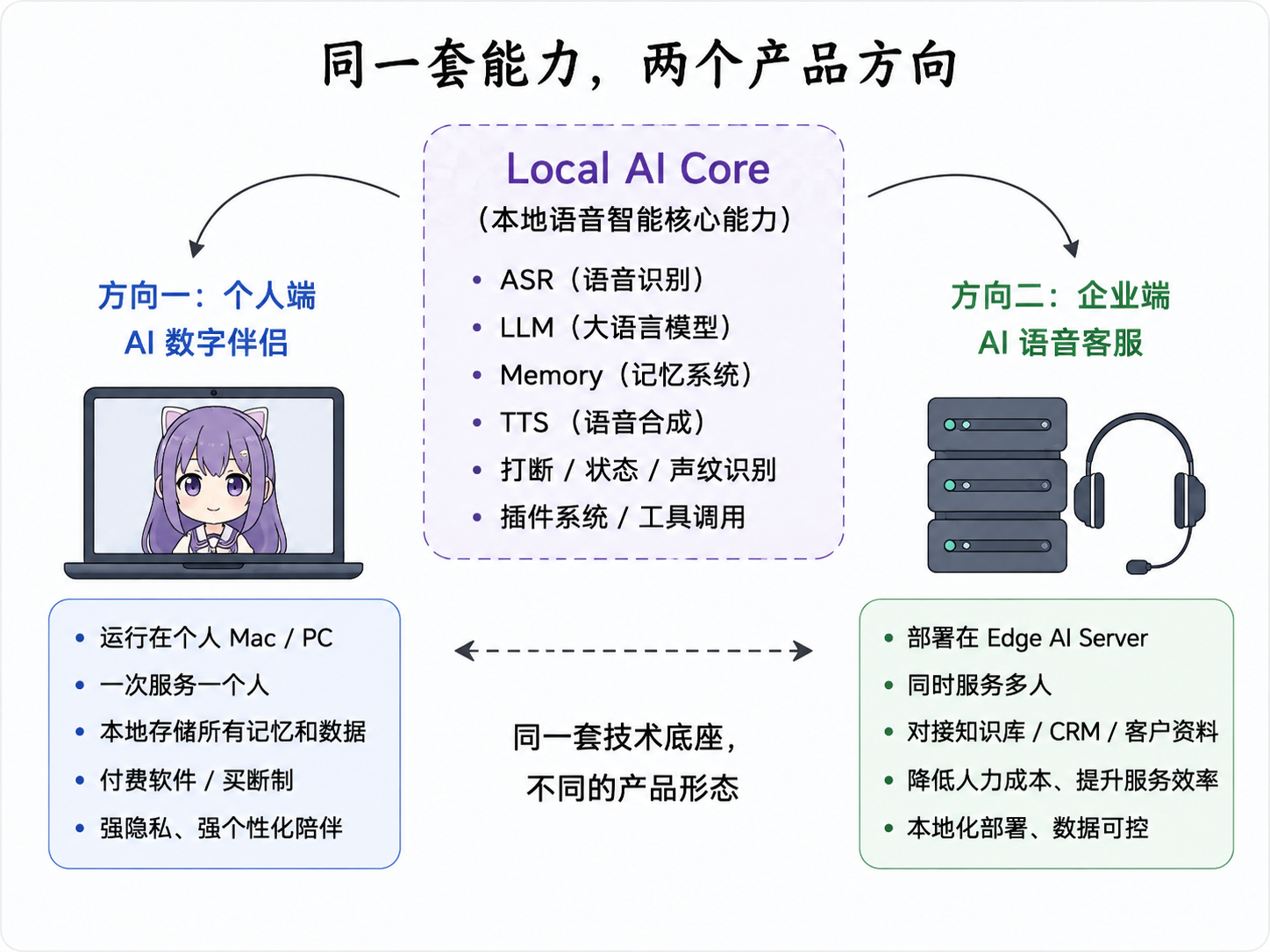
I haven't decided which path is better, and I don't think it has to be either/or. These are the two possibilities I see right now; a third or a fourth may well show up later.
Having actually built this demo out, I find myself increasingly convinced that what I'm trying to validate is no longer just an "AI girlfriend," and no longer just a voice assistant either.
What I really want to know is: can today's local models actually support a genuinely usable, locally running voice agent?
It can listen and speak. It has a local brain, memory, the ability to call tools, it knows who's talking to it, and it can have an appearance of its own.
If all of those capabilities can be delivered on a single personal computer, or a single edge AI device, then a lot of AI products that previously had to depend on the cloud may genuinely be worth rebuilding from scratch.
I'm only just getting started on this.
Next I'm planning to switch the default model to 8B, keep building out the weather, calendar, and reminder plugins, and keep improving voiceprints and memory.
I'll come back and write it all up after I've stomped through the next round of pitfalls.
References and Resources
Models and frameworks (the MLX builds I actually used)
- Qwen3-ASR / mlx-community quantized build — local streaming speech recognition
- Qwen3-TTS / mlx-community quantized build — 12Hz streaming speech synthesis
- Qwen3-4B (4bit) · Qwen3-8B (4bit) · Qwen3-14B (8bit) — the local large language models benchmarked in this article
- MLX / mlx-lm — the Apple Silicon inference framework
- VRoid Studio — the VRM anime-style character modeling tool, the source of the digital human
Open-source projects in the same direction
- moeru-ai/airi — a locally running Live2D AI companion, one of the projects closest to the approach in this article
- xikhar/persona — a local AI companion app with voice and memory
- 78/xiaozhi-esp32 — Xiaozhi: an open-source hardware voice assistant, the most active project of its kind in China
- openbmb/MiniCPM-o — an end-to-end local real-time speech model
- KoljaB/RealtimeSTT / KoljaB/RealtimeTTS — the classic local real-time speech recognition and synthesis pairing
- QwenLM — the official repository for the Qwen model family (LLM / ASR / TTS)
Subscribe · 订阅
Scan to follow on WeChat
Essays update weekly and go live on the website and on the WeChat account “AITi智能” at the same time. Scan the code to get them the moment they’re out.
- 01 Search “AITi智能” in WeChat
- 02 Follow it and add it to your favourites
- 03 Weekly updates — see you there

Scan to follow · one essay a week